Known issues in IRIS Elements
This topic lists any outstanding known issues, together with any workarounds available. You can also view fixed issues. For issues relating to migrations specifically, go to Known issues with migrating to IRIS Elements.
We are actively working to resolve these issues and will release fixes as soon as possible.
| Item | Detail | Updated |
|---|---|---|
| Unavailable actions on AML widgets | We are currently upgrading our ID checks and you may notice some changes to your AML widgets during this time. Some actions are no longer available, this includes the ability to run bulk ID checks. This will be addressed as part of our ongoing improvements. | |
| CT600 – HMRC validation error for Loans to Participators (Box A20/A45) |
Error message: If the loans to participator rate does not change in the accounting period of the return then Box A20 [or A45] must equal Box A15 [or A40] multiplied by the loans to participator rate for that period. Round down for fractions less than half a penny and round up for fractions of half a penny or greater. Description: At Budget 2025, the rate of tax payable under the loans to participators regime increased from 33.75% to 35.75%. This new rate applies to loans made or benefits conferred on or after 6 April 2026, and IRIS Elements has been updated to reflect this change. However, HMRC's Corporation Tax online service will not be updated to support the new rate until 6 April 2027. If the new rate applies to your company and you need to file your Corporation Tax return before 6 April 2027, HMRC has advised that you need to amend your return after 6 April 2027 to reflect the correct rate. Contact HMRC for guidance on how to proceed. Status: We have contacted HMRC to seek further clarification and will provide an update when additional guidance is available. Advice for customers: If you encounter this error, please contact HMRC (external link) directly for advice on how to proceed with submission. |
|
| Unable to download documents from Companies House tab |
We are aware of an issue that is preventing you from downloading documents from the Companies House tab of a client record. You can still download documents from the Documents tab. Workaround
|
|
| Account code 441 incorrectly accepted for group accounts | For FRS102 group accounts, users are able to incorrectly select account code 441. This account code is for international standards only and postings will be omitted from profit and loss calculations. Select account code 398 instead. | |
| Custom iXBRL tags not included in electronic submission to Companies House |
When you add custom tags or edit existing tags using the iXBRL tag editor, those changes are not reflected in the iXBRL file submitted to Companies House. The submission is successful and no warning or error is shown, but any changes to the tags are not submitted. We are currently working to resolve this issue. |
Fixed: 15 July 2026 |
| 'Mini menu' covering button in iXBRL tag editor when using Microsoft Edge |
When using the iXBRL tag editor on Microsoft Edge, the Microsoft Edge mini menu obstructs the tag button. To avoid this we recommend using a different browser or turning off the mini menu for IRIS Elements. You can do this in Microsoft Edge > Settings > Appearance > Context menus |
|
| Duplicate users in IRIS Elements Practice Management |
We are aware of an issue that is creating multiple copies of some users in IRIS Elements Practice Management. This could cause practice roles, jobs, and tasks to be assigned incorrectly. We are currently working to resolve this issue.
Updated: 4th July 2025 We have deployed a fix to prevent the creation of any new duplicate accounts. Duplicates that were created before 4th July 2025 will still appear. We are continuing to investigate this and remove the remaining duplicates.
Updated: 26th September 2025 We have deployed a fix to mark duplicate users as deactivated, allowing you to identify which user to assign tasks to. We have created some steps to help you reassign your tasks to the correct user: Reassign tasks from duplicate users |
Updated: 26th September 2025 |
| Missing tax returns | Following an incident on Friday 13th June 2025, you may encounter an issue when trying to access your tax returns. We are working to resolve this issue, in the meantime we recommend using these steps. | |
| Missing accounts data | Following an incident on Monday 16th June 2025, you may encounter an issue when trying to access your accounts data. We are working to resolve this issue, in the meantime we recommend using these steps. | |
| Unable to delete the Loans to participators (CT600A) supplementary page from a corporate tax return | We are aware that the Loans to participators supplementary page sections cannot be deleted from corporate tax returns. We are currently working on improving your experience. | |
|
Unable to delete the Group relief (CT600C) supplementary page from a corporate tax return IRIS Elements Tax Enterprise subscribers only. |
We are aware that the Group relief supplementary page sections cannot be deleted from the Enterprise subscription version of the corporate tax returns. We are currently working on improving your experience. | |
| Adding companies to the Group relief (CT600C) page doesn't auto-fill the profit and loss fields |
The Losses summary data is being correctly pulled from the added companies. However, they are not being added to the relevant fields. We are currently investigating the problem. Workaround The data for each company is found in the information pop-up. Hover over the information icon |
|
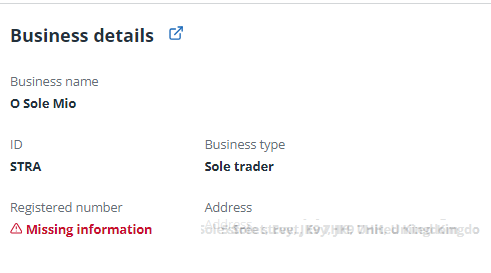
| IRIS Elements Accounts Production — Sole traders and partnerships have missing information for Registered number |
When creating accounts for a sole trader or partnership, the Entity Setup tab reports that Registered number is missing.
This information is not required for such businesses and can be ignored. |
|
| IRIS Elements Practice Management — Company information from Companies House not automatically updating |
Company information from Companies House isn't automatically updating in IRIS Elements Practice Management. This is affecting jobs and tasks that trigger updates based on Companies House date fields. Until this is resolved, you will need to force an update to regenerate any expected missing jobs. To do this we recommend removing the Company number in the Information tab, saving, then entering the number again and saving. |
 to view the losses summary. You can manually enter the data into the relevant fields.