Revise completed accounts
Product subscription required: IRIS Elements Accounts Production Professional or IRIS Elements Accounts Production Enterprise
You can revise completed accounts for limited companies and Limited Liability Partnership (LLP) accounts. You can then file the revised accounts as a supplementary note.
To revise completed accounts:
- From the Clients menu, select Clients list.
- Change the client list view to either Active clients or a custom view that includes all relevant clients and select the client you need.
- From the Accounts Production widget on the Dashboard, open the relevant period and download a copy of the account.
Download a copy of the current accounts before you revise them.
- Return to the Accounts Production widget and select the vertical ellipses for the relevant accounting period.
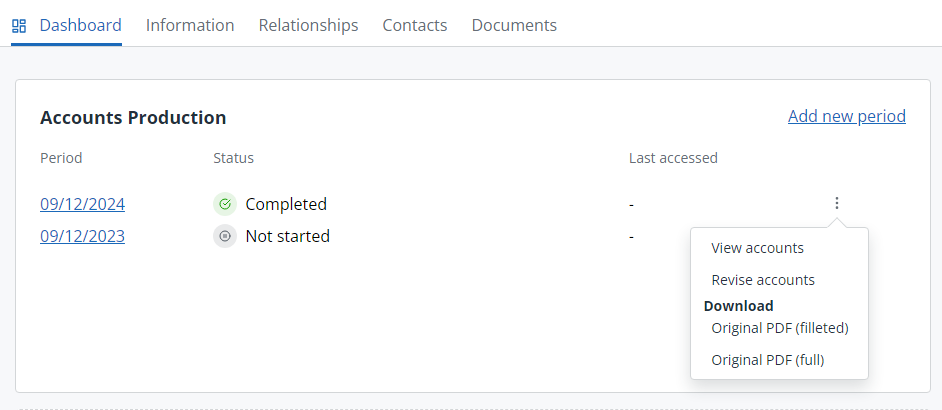
- Select Revise accounts.
- If you have downloaded a copy of the report, Continue.
If not, Cancel the process and download a copy before continuing.
- Complete the revision as required.
You can edit the accounts while they are being revised, however, completed revised accounts can only be viewed.
- Go to the Accounts Builder tab and add a Supplementary note to file with the revised accounts. Make sure your note is dated.
- When you're happy with the revision, send the accounts for approvals.
- Once approved, go to the Approvals tab and add the relevant signatures for the revision and supplementary note.
- Refresh the report for submission.
Accounts that are either currently being revised or have been revised are marked with an R in the Accounts Production client widget.