Payroll year end process
Step 4: Start year end process
-
When all pay runs are complete, on the Payroll tab, Start Monthly* Pay Run changes to Start Year End Process.
*Displays the relevant pay frequency.
- Select Start Year End Process.
-
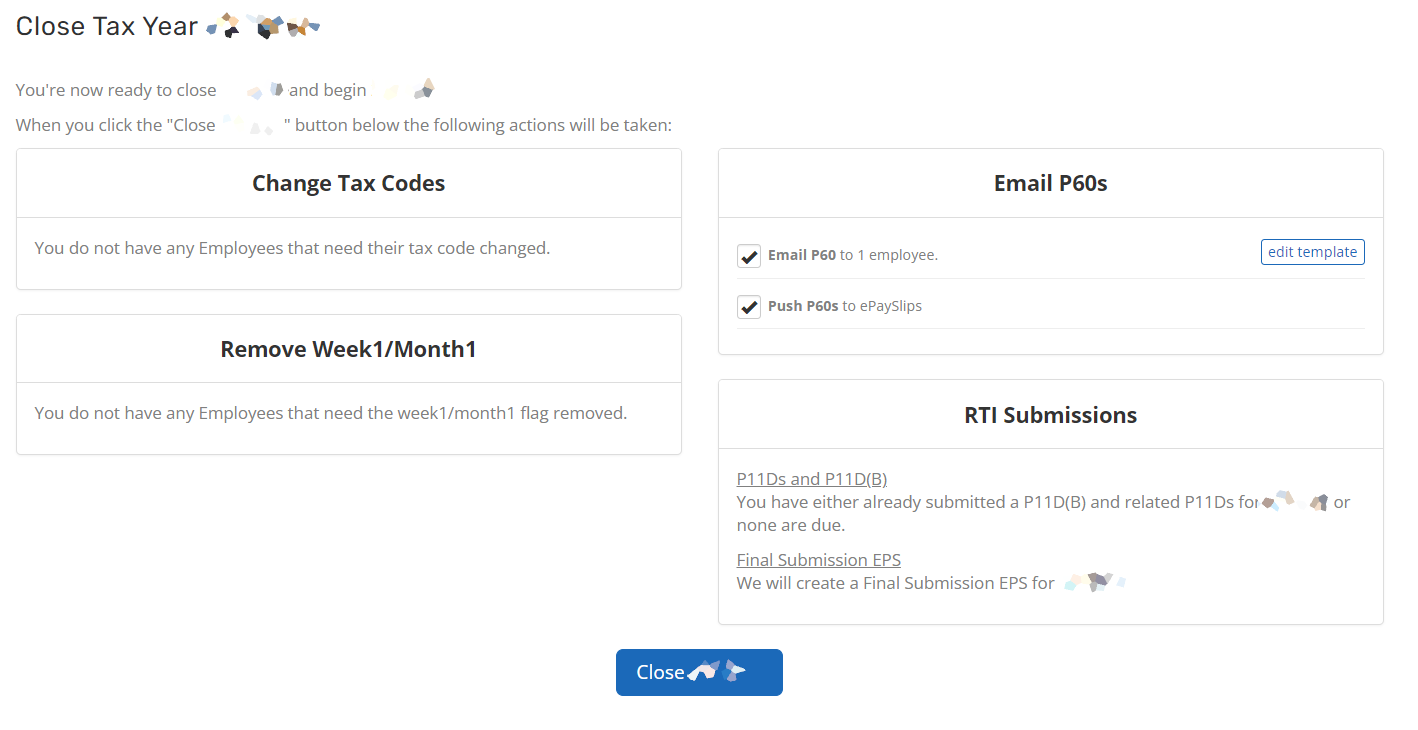
Preview the changes.
An EPS Employer Payment Summary is an RTI online submission sent monthly if, you are reclaiming statutory payments, claiming Employment Allowance (EA is only reported once per tax year), reporting Construction Industry Scheme (CIS) deductions or reporting how much Apprenticeship Levy is due. The EPS is also used to report if no employees will be paid for a whole tax month or longer. is generated. If pay run automation is active, it is sent to HMRC His Majesty's Revenue and Customs is a non-ministerial department of the UK Government responsible for the collection of taxes, the payment of some forms of state support, the administration of other regulatory regimes including the national minimum wage and the issuance of national insurance numbers. automatically. If automation is not active, Employer Payment Summary (EPS) manually.
P60s are only sent automatically to employees who have an email address, a My ePayWindow account, or an ePaySlips account if Email P60 The P60 form is issued by employers each employee detailing their taxable income and deductions made by PAYE (both for income tax and National Insurance contributions) for the tax year (6 April to 5 April). The P60 has to be given to employees by 31 May. Parts 1 and 2 of the P14 were rendered redundant by RTI at the beginning of the 2013/2014 tax year. or Push P60s are selected. To send P60s to other employees, or to resend them after moving into the new tax year, go to Produce a duplicate P60.
An example of the preview:
- Select Close [Tax year dates].
- If a message displays about configuring the pay schedule, select it and confirm the First Payment Date.
-
Choose an entry from the and then drop-down, and enter the date for the Monthly* payroll ending.
*Displays the relevant pay frequency.
-
Select Update. The first pay run of the new tax year is now ready to start.
Change tax codes — Most tax code changes happen automatically, in bulk. HMRC sends a notice for other changes to individual tax codes.