Password protect payslip emails
Payslips can be Password protected to enhance security and protection to the file sent by email.
The Password protected option requires the employee to enter the password to access the PDF payslip A statement provided by an employer to an employee, detailing their wages, deductions, and net pay for a specific pay period.This is a legal requirement under the employment rights act and should be received on or before the pay date. attached to the email.
To turn on password protection:
- Go to Employees.
- Select the required employee.
-
Select Send Payslip by email.
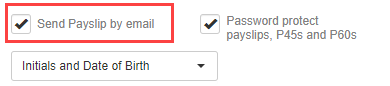
- Select Password protect payslips, P45s and P60s.
-
Select the required password type:
-
Initials and Date of Birth.
-
NI Number.
-
Custom — If selected, enter the details of the password in PDF Password.
The password does not need to match any other website password, and is stronger with a mix of numbers and special characters, for example !"£$%^&*.

-
Password details must be sent separately to the employee. A password can be set manually or generated automatically.
If a password is generated automatically, the details are included in the email.
 Related topics: