Add the IRIS Recruitment menu in IRIS HR Professional
To access the IRIS Recruitment portal from IRIS HR Professional, you must:
-
Activate the IRIS Recruitment module in System Configuration
-
Set the IRIS Recruitment permission in Set Rights Set Rights are the system permissions you allocate to employees to control the information available to a user about other employees. for yourself and any employees who need access such as a HR assistant
Only system admins can add the IRIS Recruitment menu item in IRIS HR Professional.
In this topic:
-
Activate IRIS Recruitment for your IRIS HR Professional account
-
Add IRIS Recruitment to multiple employees using Set Rights Roles
Activate IRIS Recruitment for your account as an admin
To access IRIS Recruitment for yourself, first activate it in your system, and then update your Set Rights permissions.
To do this:
Activate IRIS Recruitment in System Configuration
-
Sign in to IRIS HR Professional.
-
Go to System Tools > Utilities > Tools > System Configuration.
-
In the Modules section, select the IRIS Recruitment checkbox.
Activate the IRIS Recruitment option in your Set Rights
-
Go to My Details.
-
Select Actions > Set Rights.
-
Select the IRIS Recruitment checkbox.
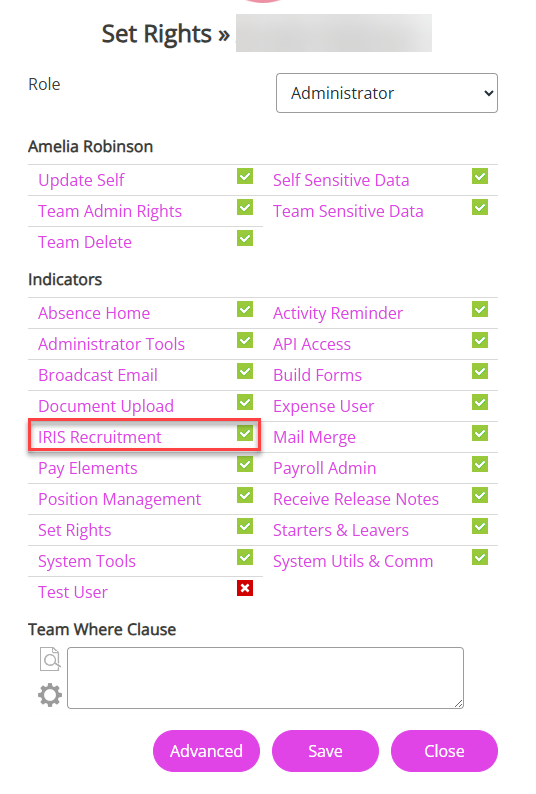
-
Choose Save.
The IRIS Recruitment menu adds to your homepage. Sign out and back into IRIS HR Professional for the menu to display.
Give an employee access to IRIS Recruitment
-
Sign in to IRIS HR Professional.
-
Go to Directories and search for the employee.
-
Select the employee’s record.
-
Select Edit.
-
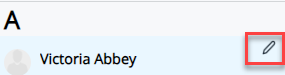
You can also select the Edit icon displayed on the employee's name:
-
-
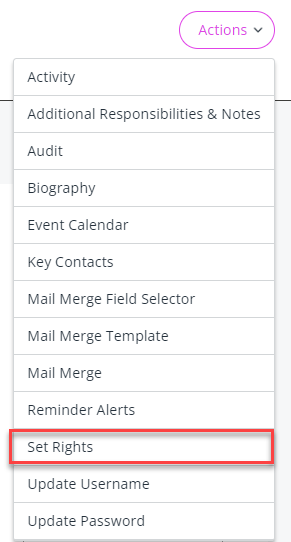
Select Actions > Set Rights.
-
Select the IRIS Recruitment checkbox.
-
Choose Save.
The next time the employee signs in to IRIS HR Professional, the IRIS Recruitment menu appears in the left navigation menu on their homepage.
Add IRIS Recruitment for multiple employees using Set Rights Roles
Instead of updating employees individually, you can update a Set Rights Role. When you add IRIS Recruitment to a role, everyone assigned to that role can access it after you reassign the role to them.
To do this:
-
Update the relevant Set Rights Role to include IRIS Recruitment.
-
Reassign the updated role to the employees who need access.
-
Use the Employee Selector to find employees who need the updated role.
Learn more about Set Rights Roles. This feature is only available if it is included in your IRIS HR Professional package.