Step 7: Make any temporary changes to the payroll
Step by step guide to running a payroll
This step covers making temporary changes to pay, such as editing a pay line or adding an addition or deduction, during a pay run.
If there are no changes to make in this pay run, go to Step 8: Record any statutory payments and leave.
-
Go to Payroll.
-
If using more than one pay schedule, select the tab for the required schedule or frequency.
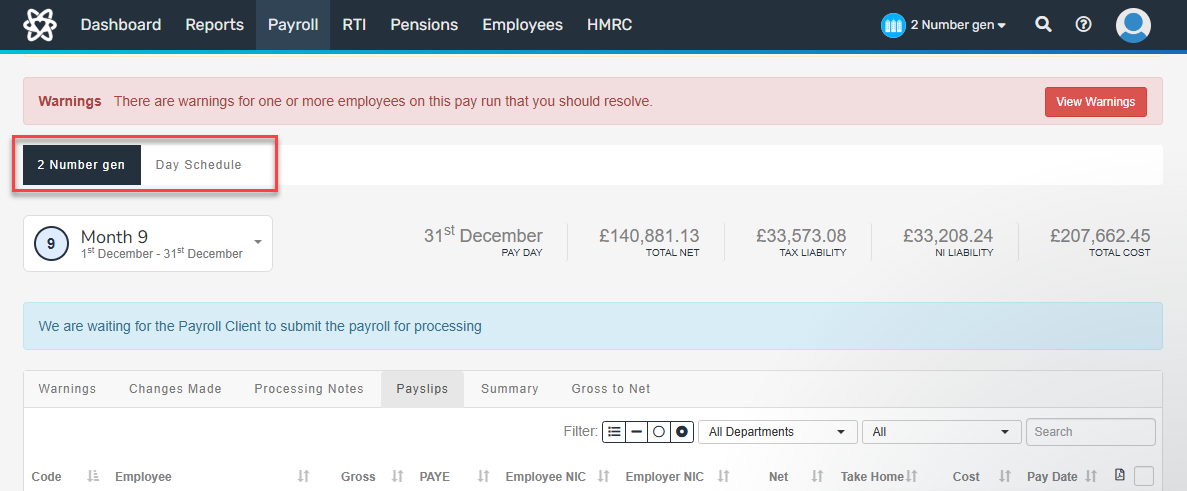
-
Select the required employee from the list.
To add a note, select Add note.
To edit an item already on the payslip A statement provided by an employer to an employee, detailing their wages, deductions, and net pay for a specific pay period.This is a legal requirement under the employment rights act and should be received on or before the pay date.:
-
Select the item and make the required changes.
Changes to basic pay The standard amount paid to an employee which excludes additional payments like bonuses, overtime, and allowances. require the hourly rate to be recalculated. To do this, select Recalculate.
-
Select Update.
To add an element to the payslip:
-
Select Edit Additions/Deductions.
-
Select New Deduction/Addition.
-
Select the required Code.
-
Enter any further required information.
-
Select Create.
-
-
Repeat for each pay element and employee.
Changes made during the pay run apply to that pay period only. The pay run recalculates after each change.
-
To view the payslip, select the payslip icon.
