Show section
The Show section enables you to work with groups of employees you have access to.
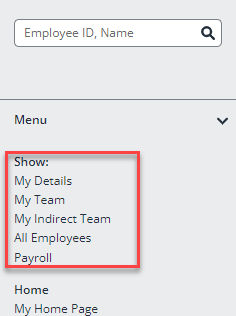
Depending on your level of access, this section includes some or all of the following:
-
My Record (all IRIS Cascade users can see this option)
-
Me and My Direct Reports
-
My Subordinates
-
All Employees I Can Access
This table describes the data you see when clicking each of these options.
|
Option |
Description / What you see: |
|
My Record |
Your own data (as configured in your profile). When you click this option, you will see your Main screen by default |
|
Me and My Direct Reports |
Your own data and data for any employee who reports directly to you. This does not include subordinates. For example, if a line manager with an assistant report to you, you will see your data and the line manager’s data, but not the assistant’s |
|
My Subordinates |
Data for any employees who report to you directly or indirectly. Using the same example as above, in this case you will see both the line manager’s data and the assistant’s data. This option cascades down, so you will see all employees underneath your reporting line. |
|
All Employees I Can Access |
Data for employees in any part(s) of your organisation’s hierarchy you have been given access to in your user account |
When viewing employee data, the name of the group you are viewing displays in the grey bar at the top of the screen.
If you want to rename any of these options, go to Admin > System Properties > Design, and then select the name of the item you want to rename.
 Releated topics: