Remove assigned security roles from a user group
CUSTADMIN access only
This guidance is only for IRIS Financials Version 7.0.2103 or earlier. If using version 7.0.2223 or later, security is managed by user group.
As part of your establishment/organisation's system implementation, a set of user groups and security roles have been set up for you. As members of your staff join and leave, or their roles change, you may need to assign different roles to a user group. In some circumstances, you may need to remove assigned security roles from certain user groups. For more information, go to Overview of Security Roles.
You can do this as follows:
- Select Maintenance, then select User Groups from the menu.
- The User Group Maintenance window opens and the left-hand panel lists all existing user groups. Select the required user group. Group details appear in the General tab. Select the Security Roles tab.
- The roles assigned to the selected use group appear in the centre panel. Select the role you want to remove, then select the X in the corner of the role details section, as this graphic shows.
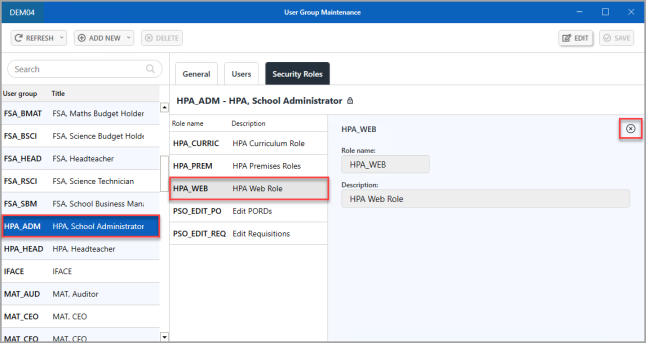
- The role that you want to remove then appears with a strike-through. Select SAVE to confirm the removal of the role (if you change your mind, close the window and select NO when asked if you want to save changes).
-
An Update complete message appears. Select OK to close the message and return to the window.