Configure access to menus
This guidance is only for IRIS Financials Version 7.0.2103 or earlier. If using version 7.0.2223 or later, go to Security for menus.
Use security roles to restrict menu access to users who have a specific security role.
- Go to Home, then select Command Security from the menu.
- The Command Security window opens. The left-hand panel lists the functions in IRIS Financials where you can set access. Expand each area by selecting Expand (+).
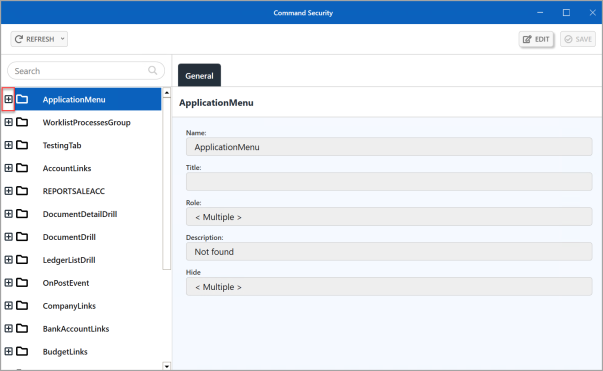
- When expanded, the ApplicationMenu heading displays the main menus within the application, which can be further expanded to show the individual menus. In this graphic, the Home menu has been expanded to show the Settings option. select EDIT.
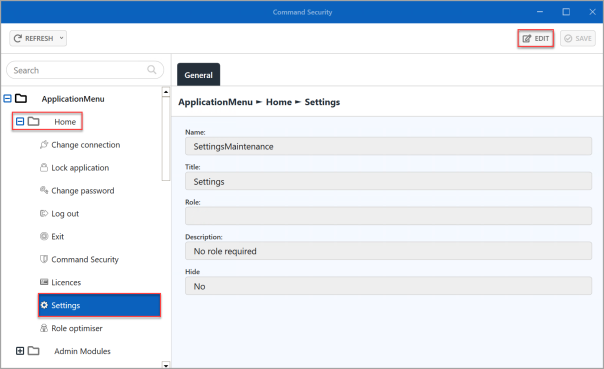 This enables settings for the applicable menu to be amended.
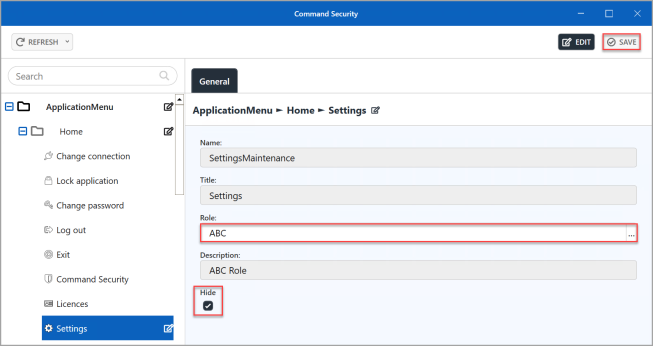
- When you have selected EDIT , the fields that you can edit become available. Select ... in Role.
- Double-select to select the required role from the Select a role for dialog.
- The selected role appears in Role. If you want to hide the menu option for all users who do not have access, select Hide.
- If you want to edit other menus or options, select the next menu/option and changes are automatically saved. Alternatively, select SAVE.
-
An Update complete message appears. Select OK to close the message and return to the window.