Prepare supplier catalogues for import
Before you import a catalogue, format the supplier's file into the correct order and file type for IRIS Financials.
The catalogue file provided by or downloaded from the supplier website must be in comma-separated values (CSV) format. If the file is in another format, contact your system administrator to convert it to CSV before you prepare it.
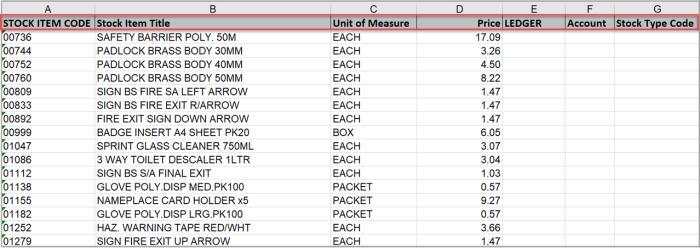
- If the following columns are not already the first four and in the following order, move them:
If any of the columns were not provided, add the columns and required details.
- STOCK ITEM CODE
- Stock Item Title
- Unit of Measure
- Price
- After the Price column, add the following columns and for all rows, enter the required details:
- Ledger — Enter the Code of the ledger the supplier account was added to
- Account — The supplier's account Code
Stock Type Code — Enter the stock type code created for the catalogue
- When you have entered all the details, save the file.