View timesheet entries
- Select Entry > My Timesheet from the menu.
- From Timesheet Entries for page, select the My Timesheet tab. Other tabs can be selected to view timesheets for Others, Staff Approval, Job Approval or Weekly Approval (depending on your permissions).
You can toggle the width of the display if required.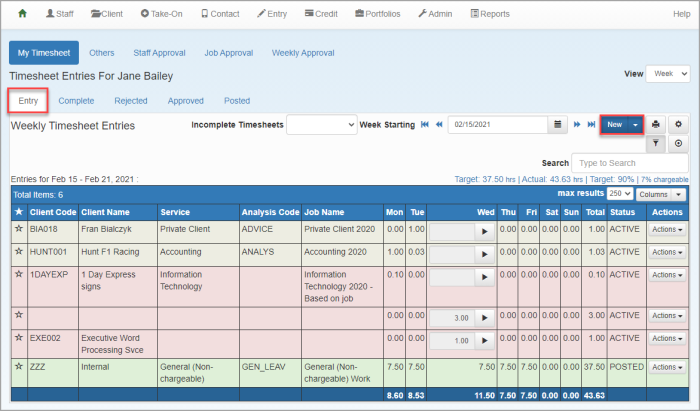
- A row of sub tabs enables timesheets to be viewed based on their status - Entry, Complete, Rejected, Approved or Posted.
You can:
View incomplete timesheets
You can view a list of Incomplete Timsheets by clicking the down arrow.
View Target vs Actual
Target hrs - Calculated by totalling the hours entered in the Work Profile theStaff Details page -Timesheet tab and multiplying by the Target %.
Target % - extracted from the Charge Target % field on
Actual - number of hours recorded on the timesheet.
Chargeable - The percentage of time that is marked as chargeable.
Search/filter timesheet entries
For large numbers of timehseet entires, it may be necessary to search. Click the Filter icon to display the Search box. Enter a minimum of 3 characters to filter the list.
