IRIS GP Payroll - Release notes: 2023
Version numbers don't reliably indicate a calendar month or release date. Sections below are dated by version number only.
Release 2023.90 | Release 2023.60 | Release 2023.50 | Release 2023.30 | Release 2023.12 | Release 2023.11 | Release 2023.10 | Current release notes | 2025 | 2024
Release 2023.90
National Insurance
On 22 November 2023, the Government announced that from 6 January 2024, National Insurance contribution rates for most employees would be lowered by 2%. We have updated the software to reflect these changes in employee NI rates.
Directors' NI contribution rates differ from employees' NI rates, and use an average rate from 6 January 2024.
From 6 January 2024, there are two sets of National Insurance rates for employees for the 2023/2024 tax year: those used for pay periods between 6 April 2023 and 5 January 2024, and those in use between 6 January 2024 and 5 April 2024. This split set of rates applies to the 2023/2024 tax year only.
When selecting Setup/Options | Tax/NI Parameters | Employees and Employers NIC Rates, a drop-down menu lets you select the National Insurance rates to view.
Rates shown above were correct when this page was published. Always check the current figures with HMRC before making decisions based on them.
Release 2023.60
NHS Pension Scheme - Scotland
We have made further changes to the NHS Pension Scheme Scotland, as per updated guidance from SPPA (Scottish Public Pension Agency). We have made the following software amendments from 1 October 2023:
-
Employee contribution rates for NHS Pension Scheme are set based on actual pensionable pay, not whole-time equivalent pensionable pay
-
Ten new pension tiers and rates for NHS Pension Scheme Scotland
NHS Pension rates - Scotland
| Tier | Pensionable pay used to determine the contribution rate | Contribution rate |
| 1 | £0.00 to £13,330.00 | 5.70% |
| 2 | £13,331.00 to £23,819.00 | 6.10% |
| 3 | £23,820.00 to £28,186.00 | 6.70% |
| 4 | £28,187.00 to £35,364.00 | 8.20% |
| 5 | £35,365.00 to £35,521.00 | 9.80% |
| 6 | £35,522.00 to £37,086.00 | 10.00% |
| 7 | £37,087.00 to £45,079.00 | 10.50% |
| 8 | £45,080.00 to £48,784.00 | 10.80% |
| 9 | £48,785.00 to £68,222.00 | 11.30% |
| 10 | £68,223.00 and above | 13.70% |
The employee's pensionable pay is rounded down when assessing which rate to apply. Rates and tiers shown above were correct when this page was published. Always check the current figures with SPPA before making decisions based on them.
To view the NHS Pension Scheme tiers and rates in use, go to Setup/Options | 12 - Tax/NI Parameters | Pension Parameters | NHS Pension Parameters and choose the relevant date from the effective drop-down menu.
Set contribution rate
From 1 October 2023, the software sets the Employee Details | Pension Details | Employee's basic contribution rate during the payroll calculation for October 2023. The employee's basic contribution rate is based on the employee's actual pensionable pay for the previous year.
For new members of the NHS Pension Scheme, the software sets the employee's basic contribution rate based on their monthly salary, and applies to both full-time and part-time employees.
We recommend printing the NHS Pension Scheme Contribution Rates Summary report after the new contribution rates are applied. It can help you check that current contribution rates are correct for your employees, and identify employees whose contribution rate must be changed manually.
It's your responsibility to ensure the contribution rate is set correctly. Pay close attention to employees who were not members of the NHS Pension Scheme for the whole of the previous year, or those who had a permanent change in pay during the previous year. You may also need to update the contribution rate for members who joined during the current year, or who had a change in employment that changed their actual pensionable pay. Refer to SPPA guidance when checking their rate.
Should you need to recalculate any earlier pay periods for any employees after the new rates apply - for example, you have calculated October but need to recalculate September - the previous rates are used for any month before October.
Release 2023.50
NHS Pension Scheme - Scotland
We have updated the pension tiers for the NHS Pension Scheme for Scotland for 2023/2024, following the changes announced recently. The changes to the pension tiers apply from 1 April 2023.
NHS Pension rates - Scotland
| Tier | Pensionable pay used to determine the contribution rate | Contribution rate |
| 1 | £0.00 to £23,819.00 | 5.20% |
| 2 | £23,820.00 to £25,981.00 | 5.80% |
| 3 | £25,982.00 to £32,914.00 | 7.30% |
| 4 | £32,915.00 to £66,017.00 | 9.50% |
| 5 | £66,018.00 to £92,423.00 | 12.70% |
| 6 | £92,424.00 to £123,147.00 | 13.70% |
| 11 | £123,148.00 and above | 14.70% |
Rates and tiers shown above were correct when this page was published. Always check the current figures with SPPA before making decisions based on them.
To view the NHS Pension Scheme tiers and rates in use, go to Setup/Options | 12 - Tax/NI Parameters | Pension Parameters | NHS Pension Parameters and choose the relevant date from the effective drop-down menu.
What do I need to do now?
After installing the update, when calculating payroll, the system automatically sets the percentage rate using the new pension thresholds, based on whole-time equivalent pensionable pay for 2022/2023. You can print a report when payroll is calculated that displays the old and new pension rates.
If you have already calculated payroll for September 2023 before installing the update, you must recalculate for the changes to take effect. Apply changes before October payroll is calculated, as further changes to the NHS Pension Scheme are anticipated from 1 October 2023.
If the employee's pension rate has changed following the update, you may need to backdate the pension contributions for previous months. You can calculate the backdated contributions manually using the new rate, but we recommend recalculating the payroll for the previous periods for affected employees, since this also updates all necessary reports.
Only employees whose whole-time-equivalent pensionable pay in 2022/2023 was between £21,615.00 and £23,819.99 should be affected by the change in tiers.
Release 2023.30
NHS Pension Scheme - England and Wales
We have updated the pension tiers for the NHS Pension Scheme for England and Wales for 2023/2024, following the changes announced recently. The changes to the pension tiers apply from 1 April 2023. The AfC pay awards have also been announced, also backdated to 1 April 2023. We have updated the pension tiers and rates for NHS Pension Scheme England and Wales, as per the updated guidance.
NHS Pension rates - England and Wales
| Tier | Pensionable pay used to determine the contribution rate | Contribution rate |
| 1 | £0.00 to £13,246.99 | 5.10% |
| 2 | £13,247.00 to £17,673.99 | 5.70% |
| 3 | £17,674.00 to £24,022.99 | 6.10% |
| 4 | £24,023.00 to £25,146.99 | 6.80% |
| 5 | £25,147.00 to £29,635.99 | 7.70% |
| 6 | £29,636.00 to £30,638.99 | 8.80% |
| 7 | £30,639.00 to £45,996.99 | 9.80% |
| 8 | £45,997.00 to £51,708.99 | 10.00% |
| 9 | £51,709.00 to £58,972.99 | 11.60% |
| 10 | £58,973.00 to £75,632.99 | 12.50% |
| 11 | £75,633.00 and above | 13.50% |
Rates and tiers shown above were correct when this page was published. Always check the current figures with NHS Pension Scheme England and Wales before making decisions based on them.
To view the NHS Pension Scheme tiers and rates in use, go to Setup/Options | 12 - Tax/NI Parameters | Pension Parameters | NHS Pension Parameters and choose the relevant date from the effective drop-down menu.
Please note:
-
NHS Business Services Authority has advised that although the uplift to thresholds applies to periods already processed, they anticipate that few employees' tier threshold, and therefore rate, will change, since the pension thresholds have been uplifted to coincide with the uplift in pay awards (5%)
-
This means that if an employee receives the same payment each month, there is no need to recalculate previous pay periods. If there are payments due for arrears from the AfC pay award, include these in the current pay period; the arrears payment should have pension contributions deducted at the normal rate - if payment of the arrears causes the pensionable pay to fall into a different tier, do not increase their pension rate
-
If the employee's pay fluctuated in previous months to include overtime, unsocial hours or similar, check whether including the pay award in that pay period would have moved pensionable pay into a new tier. If so, set the employee's pension rate to the new tier and recalculate the previous months
What do I need to do now?
After installing the update, when calculating payroll, the system automatically sets the percentage rate using the new pension thresholds, based on basic monthly salary x 12. All pensionable pay elements are included when calculating the pension contribution for the period, but are not used when setting the employee's threshold or rate. You can print a report when payroll is calculated that displays the old and new pension rates.
If you have other pay elements that should be used when setting the employee's rate, calculate what the pension contribution rate should be manually. Set the rate in Employee Details | Pension Details, then recalculate the pay period for the employee. Do not include any pay award arrears amount when setting the pension contribution rate in the pay period.
If the employee is paid the same amount each month, you should not need to backdate the changes for previous pay periods. If the employee had fluctuations in pay, or did not receive a pay award, changes may be required. You may need to recalculate the previous pay period, using the percentage rate that would apply for the new pension thresholds.
Correcting the pension calculation
If an employee's pay fluctuated in previous months, or they did not receive an annual pay award, check whether their pension rate would have changed using the new thresholds. If so, recalculate the previous periods.
To correct the calculation, remove and reprocess the incorrect periods:
-
Create a backup of your current data.
-
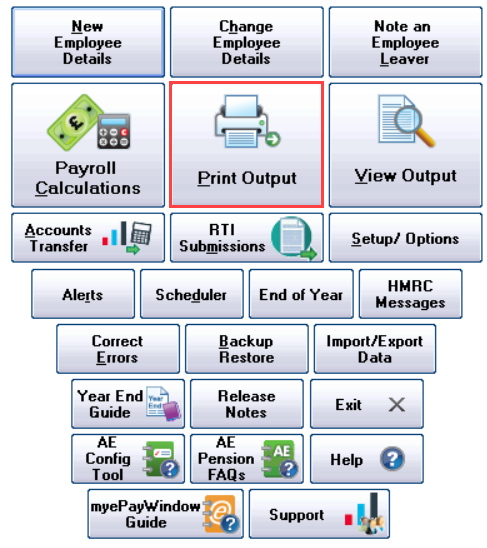
Go to Print Output.
-
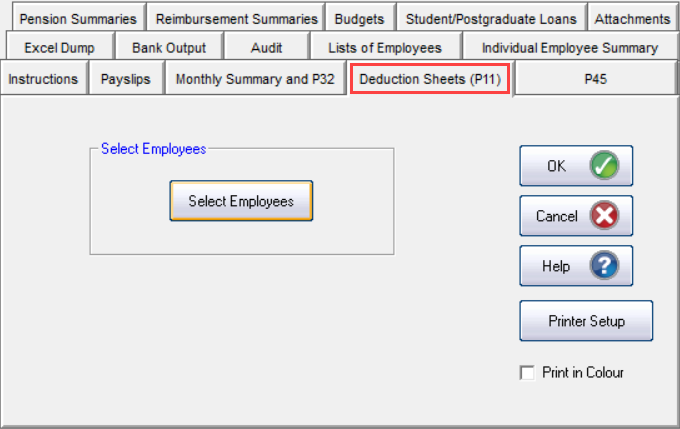
Select Deduction Sheets (P11).
-
Choose Select Employees and choose the employees affected.
This works out the corrected pay records, and shows the adjustment needed for the employee, HMRC and pension agency.
-
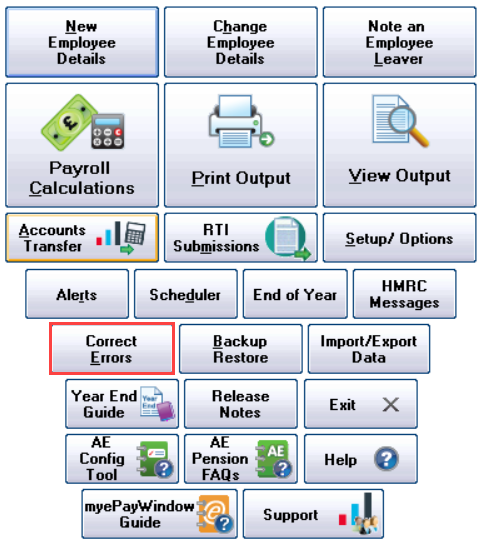
Go to Correct Errors.
-
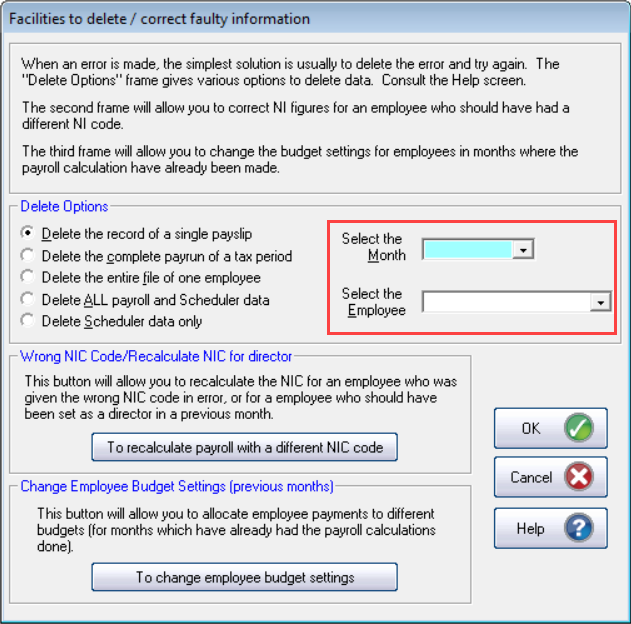
Select Delete the record of a single payslip.
-
Select the month, then select the employee.
-
Select OK.
-
Repeat for each month to be deleted.
When removing payslips, work backwards from the most current to the oldest.
-
Repeat for each employee to be recalculated.
-
Go to the employee's details and select Pension Details.
-
Check the employee is set to the correct % calculation.
Recalculate a single employee
-
From the main menu, select Payroll Calculations.
-
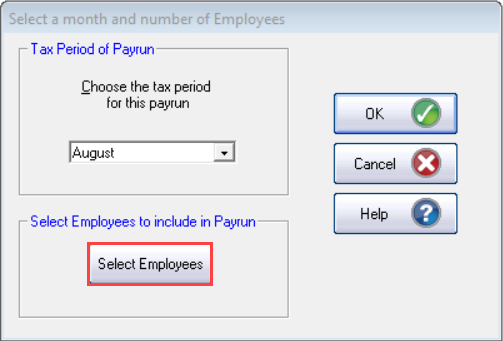
Choose Select Employees and select the employees to be recalculated.
-
Run the payroll as normal.
-
Once complete, go to Print Output, then Deduction Sheets (P11).
-
Print a P11 for each recalculated employee.
-
Check the difference between the original and corrected net pay for the employee. Apply any additional payment or deduction in your next payroll run.
-
Check the difference between the original and corrected tax, and employee's and employer's NIC. Apply any difference to your next payment to HMRC.
-
Check the difference between the original and corrected pension values. Apply any difference to your next payment to the pension agency.
Yorkshire/Clydesdale for Business Online - EFT
In the Setup/Options | 7 - Direct Banking screen, we have added a new BACS file format compatible with Yorkshire/Clydesdale for Business Online - EFT. The new format is available from the Select Bank System drop-down.
Release 2023.12
Earnings Arrestment (EA - Scotland)
We have updated the Earnings Arrestment (EA - Scotland) attachment of earnings order thresholds for the 2023/2024 tax year. The updated thresholds apply from 6 April 2023.
If you recalculate any pay periods since 6 April 2023 where an Earnings Arrestment (EA - Scotland) attachment of earnings order is present for an employee, the value deducted may change. Always check the current thresholds with the relevant Scottish authority before making decisions based on them.
Release 2023.11
NHS Pension tiers for Northern Ireland
HSC Pensions have confirmed that the pension tiers for Northern Ireland have changed. We have updated the pension tiers accordingly for 2023/2024. There is no change to the contribution rates.
| Tier | Pensionable earnings band | Contribution rate |
| 1 | Up to £13,246 | 5.1% |
| 2 | £13,247 to £16,831 | 5.7% |
| 3 | £16,832 to £22,878 | 6.1% |
| 4 | £22,879 to £23,948 | 6.8% |
| 5 | £23,949 to £28,223 | 7.7% |
| 6 | £28,224 to £29,179 | 8.8% |
| 7 | £29,180 to £43,805 | 9.8% |
| 8 | £43,806 to £49,245 | 10.0% |
| 9 | £49,246 to £56,163 | 11.6% |
| 10 | £56,164 to £72,030 | 12.5% |
| 11 | £72,031 and above | 13.5% |
Rates and tiers shown above were correct when this page was published. Always check the current figures with the HSC Pension Service before making decisions based on them.
Release 2023.10
Employee Verification Connector
We have integrated an API-based Employee Verification Connector (EVC) into IRIS GP Payroll, as part of our partnership with Experian. The Employee Verification Connector works with Experian Work Report, a service fully compliant with GDPR and Information Commissioner's Office (ICO) guidelines.
How the process works:
-
Minimal payroll-specific data is sent from IRIS GP Payroll to IRIS' holding database when sending an FPS.
-
An employee applies for a mortgage, personal loan, tenancy agreement or similar using a third party, for example their bank. This triggers a verification request to Experian.
-
Experian connects to the IRIS database to verify the employee's data.
For example, an employee applies for a loan through their bank and completes an application. The bank contacts Experian to verify the information, and Experian connects to the IRIS Employee Verification Connector to verify the data.
Opt-in/out of the EVC process
In the Setup/Options | 1 - Program Options screen, we have added a new EVC Opted-In tick box. Tick EVC Opted-In to opt in to the EVC process; untick it to opt out. If you later wish to opt back in, tick the box again.
General Data Protection Regulation (GDPR)
We have added GDPR features as part of the Employee Verification Connector process:
-
Enable Right to Restrict
-
Delete Employee Data
-
Subject Access Request
Enable Right to Restrict
In the Employee Details | Personal Profile screen, we have added a new Enable Right to Restrict button. Selecting it stops the employee's data being sent to the Employee Verification Connector, and the button label changes to Disable Right to Restrict. Each time it's selected, the Last Updated field updates with the date and time.
Delete Employee Data
In the Employee Details | Personal Profile screen, we have added a new Delete Employee Data button. Selecting it deletes the employee's data from the Employee Verification Connector. Each time it's selected, the Last Requested field updates with the date and time.
Subject Access Request (SAR)
We have added a Subject Access Request button that lets employees request a copy of their data stored on the Employee Verification Connector. Selecting it opens the IRIS Employee Verification Request - SAR Request screen, where you can generate a report to print or email to the employee. Each time it's selected, the Last Requested field updates with the date and time.
If you restore a backup, check the EVC Opted-In status and amend it if required.
Spreadsheet Import
We have added a new Spreadsheet Import button to the Payroll Calculation | Temporary Adjustments screen, letting you import basic payroll data each month, including basic salary, hours and overtime payments. Select the Spreadsheet Import button to open the Spreadsheet import screen.
Spreadsheet import screen
The Spreadsheet import screen includes the following import options:
-
Skip header rows - ignores the top rows of the file during import
-
No of rows to skip - enter the number of rows to ignore during import; enabled when Skip header rows is selected
-
Ignore last row - disregards the final row of the file during import
-
Ignore zero values - disregards any 0.00 amounts in the file during import
The screen also includes a File Location field, where you can enter or browse to the file you want to import. You can import .xls and .xlsx file types only. Selecting Import validates the data and begins the import process. If all data imports with no rejections, a confirmation message displays. View any import rejections in the Spreadsheet Reject.TXT file.
Spreadsheet import fields
The spreadsheet import file must include the following fields, in this order, for the import to succeed:
| Column | Description | Notes |
| A | Surname | Used to match the import file to the correct employee |
| B | Forename | Used to match the import file to the correct employee |
| C | Annual Salary | If required, enter the employee's annual salary |
| D | Monthly Salary | If required, enter the employee's basic/special salary |
| E | OT x 1 | If required, enter the employee's overtime hours |
| F | OT Total | If required, enter the monetary value of the employee's overtime hours |
| G | Bonus | Imported only where the Extra Payment is named Bonus |
| H | Back Pay | Imported only where the Extra Payment is named Back Pay |
| I | Holiday Pay £ | Imported only where the Extra Payment is named Holiday Pay £ |
| J | SMP etc | Information not imported |
| K | SSP | Information not imported |
| L | Unpaid Leave | Imported only where the Extra Deduction is named Unpaid Leave |
| M | Childcare Vouchers | Information not imported |
| N | Sickness Deduction | Imported only where the Extra Deduction is named Sickness Deduction |
| O | Advance | Imported only where the Extra Deduction is named Advance |
| P | Employee Pension % | Information not imported |
| Q | Employer Pension % | Information not imported |
Spreadsheet template
A Spreadsheet Import template is stored in the program folder, for example C:\Payroll, which you can use to create your spreadsheet import file.
The import automatically includes overtime payments in the pensionable pay for part-time employees. Check the pensionable pay for part-time employees thoroughly, and make any amendments manually.
Student Loan Thresholds
We have updated the annual thresholds in line with legislation for the 2023/2024 tax year:
-
Plan Type 1 increased from £20,195 to £22,015
-
Plan Type 2 remains at £27,295
-
Plan Type 4 increased from £25,375 to £27,660
-
Postgraduate Student Loans remain at £21,000
Threshold values shown above were correct when this page was published. Always check the current figures with HMRC before making decisions based on them.
Tax Code Changes
As all personal allowances remain at 2022/2023 levels, there is no increase in tax codes for the 2023/2024 tax year.
Tax, NI, SSP, SMP, SAP, SPP, ShPP and SPBP
We have updated the rates for tax, NI, and statutory payments for the 2023/2024 tax year.
National Minimum Wage / National Living Wage
We have updated the National Minimum Wage and National Living Wage rates in line with legislation for the 2023/2024 tax year.
AE parameters
We have updated the AE parameters, in line with legislation, for the 2023/2024 tax year.
P60s
We have updated the P60s for year-end 2022/2023.
RTI
Full Payment Submission (FPS)
The FPS schema has been updated for the 2023/2024 tax year, in line with government legislation, including the new Health and Social Care Levy fields.
Employer Payment Submission (EPS)
We have updated the EPS schema for submissions relating to the 2023/2024 tax year.
Earlier Year FPS
We have updated the Earlier Year FPS schema for submissions relating to the 2022/2023 tax year.
myePayWindow
Payslips
We have resolved an issue where hourly rates were not displayed on payslips generated in myePayWindow.
To show hourly rates on the payslip in myePayWindow: where Employee Details | Type of Employee is "1 - Normal Staff - paid for a single post", tick "Show rate/hour on payslip" for that employee type; where it is "2 - Staff with more than one post", tick "Show the rate per hour on the payslip" and "Show each post separately on the payslip" in the Pay Details screen for the associated employee.
All other Type of Employee options are unaffected.