Statutory Payments Uprating Error - April 2026
An error regarding the 2026/27 tax year uprating dates for statutory payments was announced by HMRC His Majesty's Revenue and Customs is a non-ministerial department of the UK Government responsible for the collection of taxes, the payment of some forms of state support, the administration of other regulatory regimes including the national minimum wage and the issuance of national insurance numbers. in April 2026. This means some employees were paid the new rate 1 day early, resulting in an overpayment A situation in which an employee receives more money than they are entitled to, often due to an error in the payroll calculations. of £7.14.
Initially, the Department for Work and Pensions (DWP) provided incorrect dates, leading to potential discrepancies in payroll systems.
HMRC have announced they will not pursue unintentional errors where the wrong date was applied for these payments in the 2026/27 tax year.
Error Details
While Statutory Maternity Pay (SMP Statutory Maternity Pay is the pay an employer must give to female employees on maternity leave, for up to 39 weeks.) increased on 5th April 2026, the other parental payments listed below were meant to increase on 6th April 2026.
- Statutory Paternity Pay (SPP Statutory Parental Pay refers to the pay an employer must give to an employee who takes time off to care for their child, or surrogate's child, for up to 2 weeks.)
- Statutory Adoption Pay (SAP SAP or Statutory Adoption Pay. If an employee is adopting a child with a partner, one of them may be entitled to SAP and the other may be entitled to Ordinary Statutory Paternity Pay (OSPP). SAP usually follows the same basis as SMP in terms of amounts of length of time.)
- Statutory Shared Parental Pay (ShPP ShPP or Shared Parental Pay. A person claiming SMP or SAP may end their leave early and the remainder used by another parent, this leave will be ShPP.)
- Statutory Parental Bereavement Pay (SPBP Statutory Paternity Pay is the pay an employer must give to an employee who takes time off to care for their partner, for up to2 weeks.)
- Statutory Neonatal Care Pay (SNCP)
Correcting statutory payments made within the current pay period
If an affected statutory payment has been made within the current pay period:
- Go to Payroll, then select the relevant employee.
-
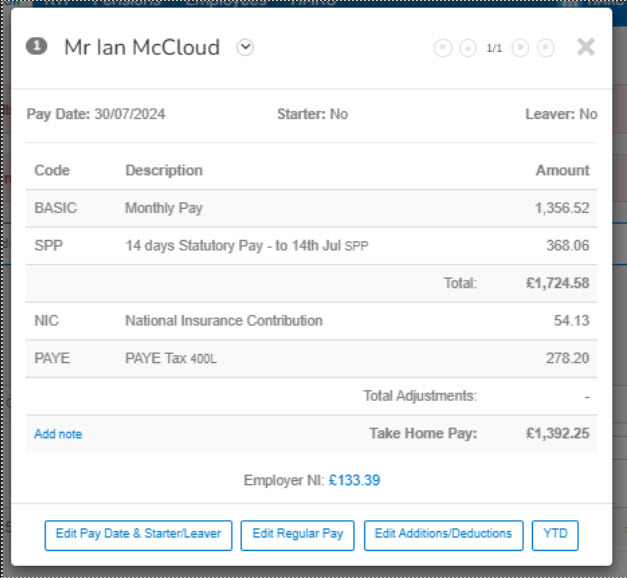
Open the employee's payslip A statement provided by an employer to an employee, detailing their wages, deductions, and net pay for a specific pay period.This is a legal requirement under the employment rights act and should be received on or before the pay date. and select the line with the statutory payment.
-
Select Override the calculated value.
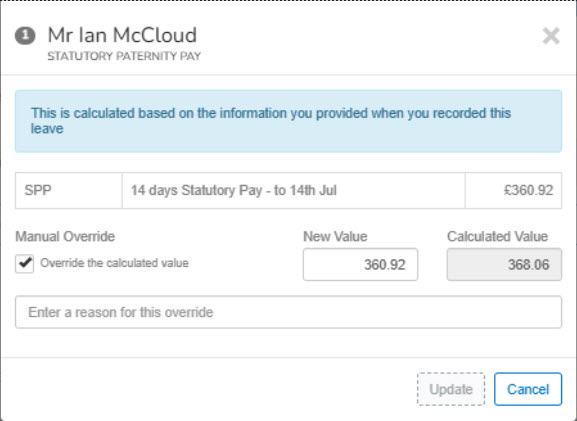
- Enter the updated amount.
- To confirm and save, select Update Value.
Correcting statutory payments made in a previous pay period
If an affected statutory payment has been made in a previous pay period:
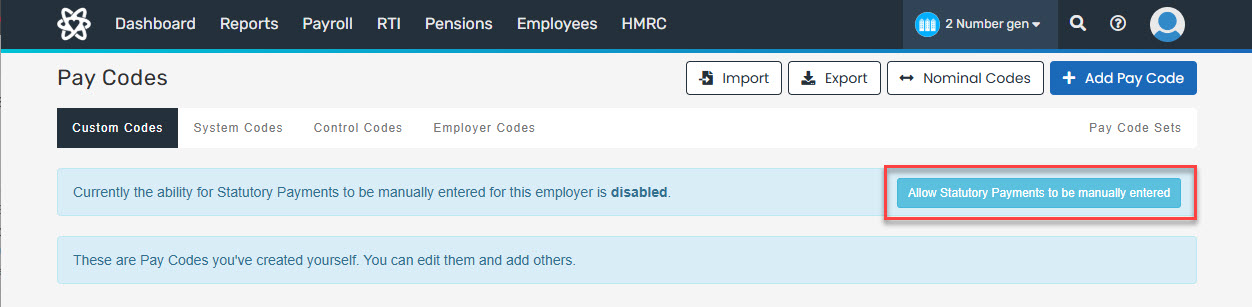
- Go to Settings, then select Pay Codes.
-
Select Allow Statutory Payments to be manually entered.
- Go to Payroll, then select the relevant employee.
-
Open the employee's payslip and select Edit Additions/Deductions.
- Select the line with the relevant pay code.
- Enter the Add Fixed Period Amount.
- To confirm, select Update.
- To apply the changes, select Update.
Updated values for current pay period and previous pay period payments will be reflected in the next available Employer Payment Summary Employer Payment Summary is an RTI online submission sent monthly if, you are reclaiming statutory payments, claiming Employment Allowance (EA is only reported once per tax year), reporting Construction Industry Scheme (CIS) deductions or reporting how much Apprenticeship Levy is due. The EPS is also used to report if no employees will be paid for a whole tax month or longer. (EPS Employer Payment Summary is an RTI online submission sent monthly if, you are reclaiming statutory payments, claiming Employment Allowance (EA is only reported once per tax year), reporting Construction Industry Scheme (CIS) deductions or reporting how much Apprenticeship Levy is due. The EPS is also used to report if no employees will be paid for a whole tax month or longer.) submitted to HMRC.