Import and update car benefits
You can create or update multiple employee benefits in one go, making it faster and easier to manage benefits without editing each record separately.
Example...
You can also download a Benefits report that includes the unique identifiers for pre-existing benefits.
To download:
-
Open the required company.
-
Go to Reports and select Employee.
-
Select Employee Benefits.
-
Select the required Benefits option.
Changes made are permanent.
To import:
-
Open the required company.
-
Go to Employees and select Import.

-
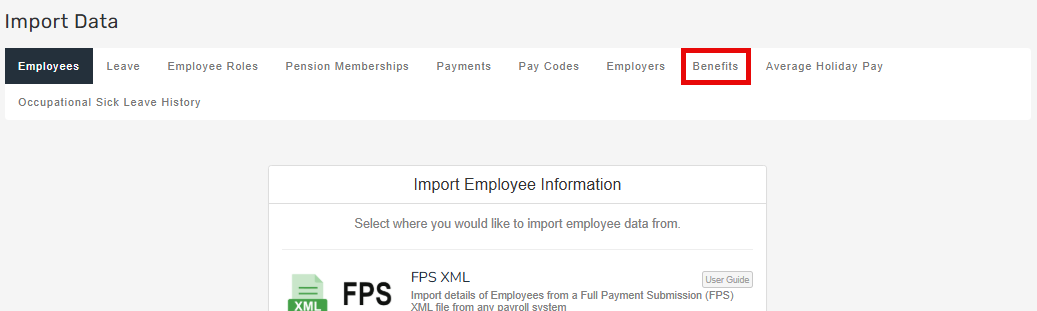
Select Benefits.
-
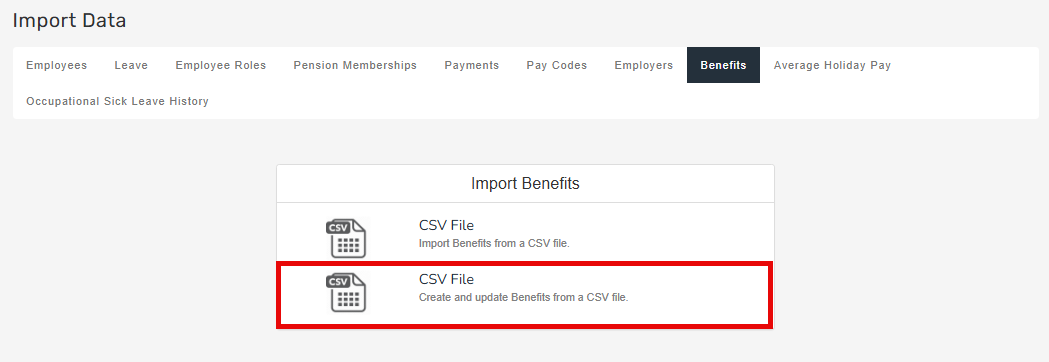
Select CSV File – Create and Update.
-
Drag the file from your device or click to browse.

All benefit imports will run asynchronously, allowing you to continue working while imports process in the background.
| Field Name | Accepted Values |
| Tax Year | Start of the tax year. Must begin with Year and contain no spaces. For example Year2023. |
| Type | Car |
| Declaration Type | P11D P11D is used by employers to report end-of-year expenses and benefits for employees who earned more than £8,500. Employees who receive Benefits in Kind (BiK) are entitled to an end of year report that outlines their benefits and expenses in the tax year. or PAYE PAYE or Pay as you earn is an HM Revenue and Customs’ (HMRC) system to collect Income Tax and National Insurance from employment. |
| Description | Car |
| Make and Model | Free Text. (This information can be found on the V5 certificate) |
| Registration | Free Text. (This information can be found on the V5 certificate) |
| First Registered | dd/mm/yyyy |
| Has Approved Emissions Value | True or False |
| Co2 Emissions | 0.00 (Can be found on the V5 certificate) |
| Engine Size | 0.00 (Can be found on the V5 certificate) |
| Zero Emissions Mileage | 0.00 |
| Fuel Type | Diesel (Euro Standard),Diesel,Petrol/Other,Hybrid,Electric |
| Available From | dd/mm/yyyy |
| To | dd/mm/yyyy |
| Days Unavailable | 0.00 |
| List Price | 0.00 |
| Non-Standard Accessories | 0.00 |
| Employee Capital Contributions | 0.00 |
| Employee Private Contributions | 0.00 |
| Free Fuel | True or False |
| Fuel Available From | dd/mm/yyyy |
| Fuel Available To | dd/mm/yyyy |
| Registered Prior to 1998 | True or False |
| Rate | |
| Chargeable Value | |
| Full Year Charge | |
| Cash Equivalent | |
| Cash Equivalent Fuel | |
| Benefit to Date Opening Balance | 0.00 |
| Start Date | dd/mm/yyyy |
| End Date | dd/mm/yyyy |
| Use Pro Rata | True or False |
| Override Benefit to Date Opening Balance | True or False |
Good to know...
-
If a unique identifier is present, the benefit will be updated.
-
If a unique identifier is not present, a new benefit will be created.
-
Payroll Code is mandatory to identify the employee.
-
This import will update open payroll runs.
-
A V5 is also known as a V5C and is a physical document issued by the DVLA upon registration of a vehicle in the UK.
-
GOV.UK Guide: Expenses and benefits: company cars and fuel. External website
-
GOV.UK Guide: Expenses and benefits: A to Z. External website