Emailing Suite overview
The Emailer Suite product consists of three modules:
Statement Emailer - used to automatically email statements to customers, which include any paid and outstanding invoices. The statements can also be printed for any customers who do not have an email address (if required).
Document Emailer - used to batch email purchase orders/sales invoices (based on the report template selected when the module is configured) to suppliers/customers. You can also use the module to add or open attachments and comments on transactions, and to maintain addresses.
Remittance Emailer - used to email and print remittance advices for distribution to suppliers that are based on a previously defined paylist.
The suite of products needs to be configured on each user machine before being used. For more information, refer to Configure the Emailing Suite.
Each module is similar in look and operation:
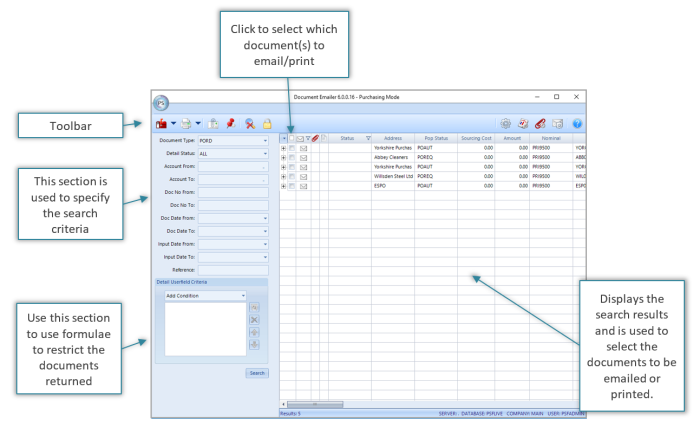
Emailer icons
There are standard menu items that are the same for each module within the Emailer suite (Document Emailer, Remittance Emailer, and Statement Emailer).

|
Icon |
Name |
Description |
|---|---|---|
|
|
Mail/Email Documents |
Select to send emails to selected accounts. |
|
|
Print Documents |
Select to print statement/document/remittance advice for selected accounts. |
|
|
Attachment Manager |
Select to display the file path of a document attached to a selected account. |
|
|
Comment Manager |
Select to open or add a comment on a selected account. |
|
|
Hide Criteria Panel |
Select to show or hide the search panel. |
|
|
Change Connections |
If the database has multiple connections, select to switch between companies. |
|
|
Settings |
Select to open or update the report server details. |
|
|
Configure Reports |
Select to open or update the report file path or edit the email settings. |
|
|
Document Type Attachments |
Select to attach a document to all documents of a type that you send. |
|
|
SMTP Settings |
Select to set up a new connection, or edit an existing SMTP connection. |
|
|
Help |
Select to show version information about the module. |


