Create group structure
Product subscription required: IRIS Elements Accounts Production Enterprise
Group accounts are currently available for limited companies only.
Before you begin
-
Create standard accounting periods for all companies.
-
Make sure the standard accounting periods of all companies overlap.
Create a group
-
Select the parent company from the Clients list.
-
Go to Relationships, then Group structure.
-
Select Add undertakings.
-
Search by client name or ID.
-
Select the clients you want to add to the group.
You can add information for multiple undertakings at the same time.
-
Complete the required information for each client:
-
Shareholdings (%)
Shareholding percentages are for informational purposes only and do not drive any calculations — manually adjust trial balances as needed.
-
Effective from
-
Effective to — Optional
-
Type — Choose from the following types:
-
Subsidiary — controlled by the parent, usually through majority shareholding. Included in consolidation by default.
-
Associate — the parent has significant influence but not control. Excluded from consolidation by default.
-
Joint venture — jointly controlled by the parent and one or more other parties. Excluded from consolidation by default.
-
-
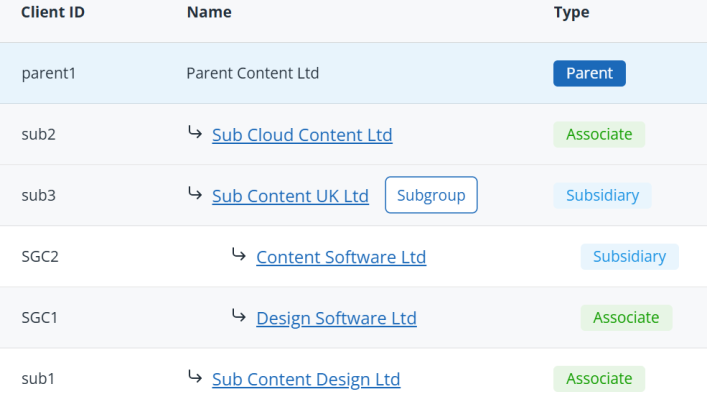
Subgroups
When an undertaking in the group is a parent of its own group, its undertakings will be included in the wider group structure as a subgroup.
You can have up to 3 levels of subgroups within a group.
Select Subgroup next to an undertaking's name to show its subgroup structure.
Next step: Complete Entity Setup for group period