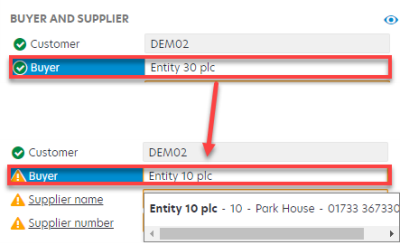
Supplier has Emailed Invoice to Incorrect Location
When purchase orders are raised in IRIS Purchasing, the invoice location is determined by the supplier Account Code used.
If your establishment/organisation has multiple locations or entities, each supplier is assigned a unique supplier Account Code for each location. The following graphic displays ADT Security Services appearing multiple times. Each instance is prefixed by the location code.
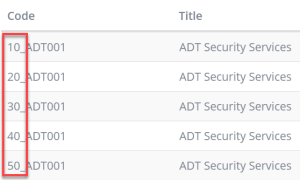
When location 10 places a purchase order, they use 10_ADT001; location 20 uses 20_ADT001, and so on.
If a purchase order is raised against 10_ADT001, IRIS Invoice Matcher expects an invoice to be received against 10_ADT001.
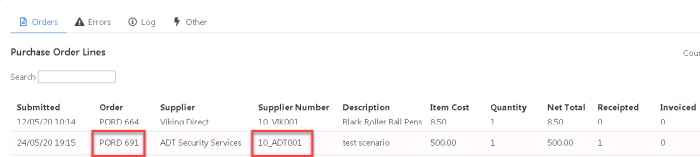
If the invoice is emailed to another location's email address, or the invoice is manually uploaded to a different supplier account, it is flagged for Manual Verification.
Scenario: An organisation is made up of 5 locations: Location 10, Location 20, Location 30, Location 40, and Location 50.
A purchase order has been raised against 10_ADT001 - location 10. The purchase order has been authorised and the goods received note has been entered. IRIS Invoice Matcher is expecting a purchase order invoice to be received against 10_ADT001.
The supplier emails the purchase order invoice to location 30 in error.
In this scenario IRIS Invoice Matcher extracts the purchase order invoice to supplier account 30_ADT001. As IRIS Invoice Matcher is not expecting the invoice to arrive against 30_ADT001, it is flagged for Manual Verification.
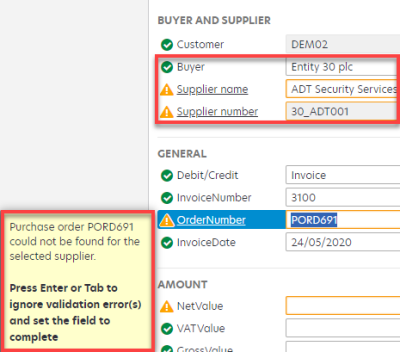
You can log in to IRIS Invoice Matcher and manually change the supplier code from 30_ADT001 to 10_ADT001 and verify the purchase order invoice. For more information, please see Manually Validate a Non Order Invoice or Manually Validate a Purchase Order Invoice.