How do I check VAT nominals are linked to the VAT Return?
The 9527 - Reverse Charge Input VAT and 9526 - Reverse Charge Output VAT nominals must be linked to the relevant box on the VAT return. For additional guidance on what is required in your VAT Return, go the How to fill in and submit your VAT Return guidance on gov.uk.
The nominals should already be linked to the relevant VAT return boxes when IRIS Financials was installed.
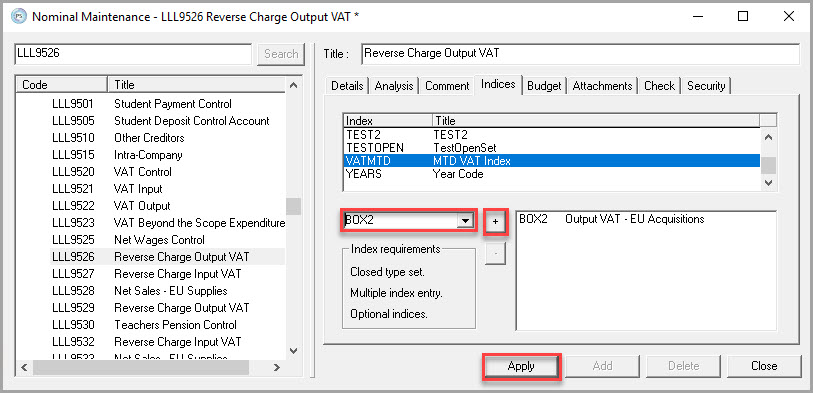
- Go to Masters, then select Nominals.
- Select the required nominal, then Indices.
- From the Index list, select VATMTD.
-
Check the nominal has been linked to the correct box on the VAT return, from the following:
Organisations in England, Scotland, and Wales Only
Nominals VAT Making Tax Digital (MTD) Return Index Box 4 (VAT) - Journal Value figure
Box 7 (Net) - This gets the invoice VAT UserValue line
9526 - Reverse Charge Output VAT Box 1 (VAT) - Journal Value figure
9528 - Net Sales - EU Supplies Box 6 (Net) - Journal Value figure
Organisations in Northern Ireland Only
Nominals VAT Making Tax Digital (MTD) Return Index Box 4 (VAT) - Journal Value figure
Box 7 (Net) - This gets the invoice VAT UserValue line
Box 9 (Net) - Journal UserValue figure
9526 - Reverse Charge Output VAT NI Box 2 (VAT) - Journal Value figure
If the nominal has not been linked to the boxes on the VAT return:
- From the drop-down list select the required box, then +.
-
Select Apply to save the changes.