Reconcile a VAT period with a trial balance
When you post a document in IRIS Financials, the system posts transactions to an accounting period and a VAT period/quarter, which are independent of each other. This means you can post transactions to different accounting and VAT periods/quarters. This typically happens if you receive an invoice late and have already completed the VAT return for that period.
Accounting period - the financial period in which the entire transaction is recorded, for example, Year 2022 Period 06. This appears on the header line of the document.
VAT period/quarter - each VAT period/quarter exists as an account on the VAT ledger, for example, 2022Q3 and denotes which VAT period/quarter the document posts into. This appears on the VAT line of the document.
When you reconcile a VAT period/quarter to the trial balance, remember that you can post a document into one accounting period but a different VAT period/quarter.
To check which accounting periods are appearing in a VAT period/quarter:
- Go to Maintenance, then select Accounts from the menu.
- The List of Ledgers dialog opens. Double-select to select the VAT ledger. If your establishment/organisation has separate VAT ledgers for each location, you need to repeat this process for each ledger.
- The Account Maintenance window displays. Select the required VAT account from the left hand panel, then select LINKS to display the Links panel.
- Select Details.
- The Detail Enquiry window opens. Right-select on any of the existing column headers to display the column chooser, then select Period to add this column to the display.
- Drag the Period column to the Drag a column header here to group by that column section.
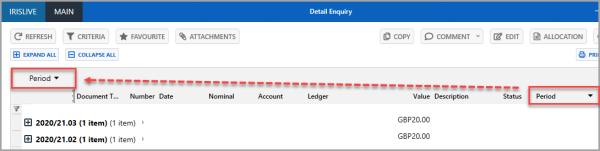
- This groups all VAT transactions in the VAT period/quarter by accounting period.
Why does this happen?
For example, if you receive an invoice late and the previous VAT period is already closed, the system lets you post the document to the correct accounting period, but automatically posts the VAT into the next available VAT period/quarter to include it in the next claim.
A trial balance is reported by accounting period. The balance on a VAT nominal may include transactions in different VAT periods/quarters. To check the breakdown of VAT periods against a VAT nominal:
- Go to Enquiries, then select Trial Balance from the menu.
-
The Trial Balance window displays. Right-select on the applicable VAT nominal and select Summaries.
-
The Nominal and Account - Summary Enquiry window opens. The balance of the VAT nominal is summarised by VAT period/quarter.