Set module security and access levels
This guidance is only for IRIS Financials Version 7.0.2103 or earlier. If using version 7.0.2223 or later, go to Security for IRIS Financials applications.
Access to the individual modules within IRIS Financials is achieved by assigning a user group to one or more modules/applications via the Administration module.
In addition, you can set the level of access for each module. Access levels determine the minimum level required to access specific data in the system. The levels range from 0-9. Typically, standard users have level 3 access, power users have level 8 access, while System Administrators have level 9 access. The access levels are defined via user groups, then the minimum access level required for the specific data (such as ledgers, nominals and accounts) is specified within the data properties.
By default, all data has a minimum access level of 3, so a user group with an access level of 3 can view and maintain all data.
- Launch the Administrator module by selecting Admin Modules, then selecting Administrator from the menu in IRIS Financials.
- For added security, you are prompted to login again with your System Administrator account details.
- The PSF Administration dialog opens. The left-hand panel shows an explorer view of the system, including the databases and user groups. The right-hand section gives access to the applicable security information, which you can read and edit. Select the required database from the Databases folder.
- Select the Security tab. You may need to adjust the size of the window, together with the column widths to make the content more visible.
- Scroll to the end of the list until an empty list is visible. Select the required user group from this list.
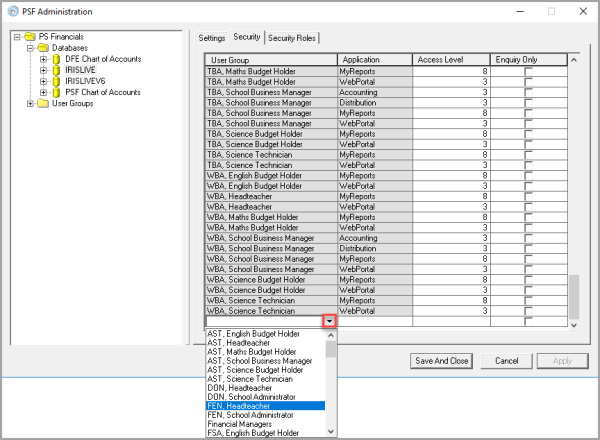
- In the Application column, select the module you would like to give the user group access to.
- Enter the required Access Level. You can enter a value from 0-9.
- If you want to give a user read-only access to a module, select Enquiry Only. This lets auditors access applicable data without being able to edit anything.
- Repeat this process for each module you want the user group to have access to.
- Once you have finished applying the security settings, select Save And Close.