Produce a list of user groups and users

CUSTADMIN access only

A variety of security reports are available to show the specific security properties of existing user groups and users. This can be useful for working out which user group is the most appropriate for a new user.

  1. Select Modules, then select Reporting Suite from the menu.
  2. From the Additional Reports panel, select the Security Reports Dashboard.
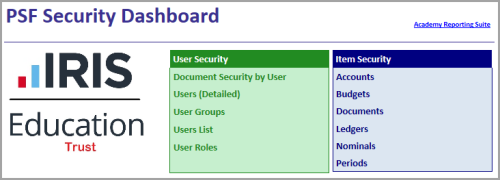
  3. The PSF Security Dashboard appears.
    PSF Security Dashboard. The green User Security panel lists Document Security by User, Users (Detailed), User Groups, Users List and User Roles. The blue Item Security panel lists Accounts, Budgets, Documents, Ledgers, Nominals and Periods.
    You can select the following reports:
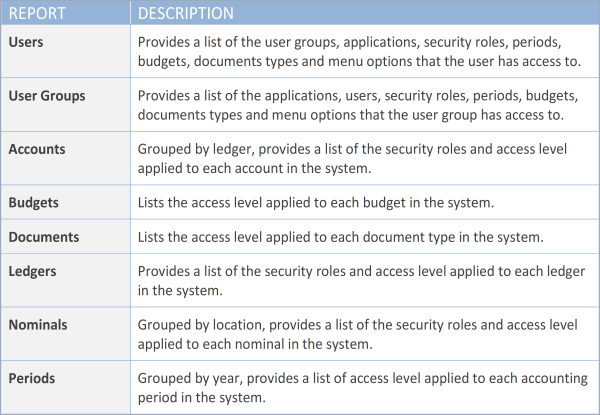
    Table of the security reports. User reports list what a user or user group can access. Accounts, Ledgers and Nominals reports list security roles and access levels. Budgets, Documents and Periods reports list access levels.
  4. This graphic shows an example of the User Groups report.
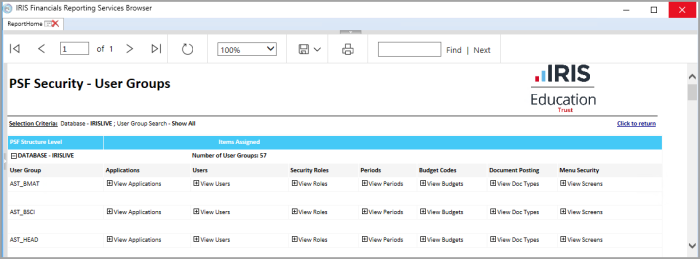
    PSF Security - User Groups report in the IRIS Financials Reporting Services Browser. The report lists each user group with its applications, users, security roles, periods, budget codes, document posting and menu security.
  5. You can expand the report to show the properties of each user group, including the applications, users, security roles, periods, documents and menus that the user group can access. Select Expand (+) in the required section to display the details.
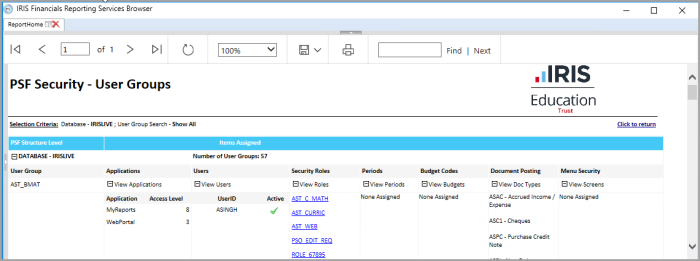
    PSF Security - User Groups report with the details for the AST_BMAT user group expanded. The expanded area lists its applications, users, security roles, periods and document types.