Security access levels overview
This guidance is only for IRIS Financials Version 7.0.2103 or earlier. If using version 7.0.2223 or later, go to Security access levels.
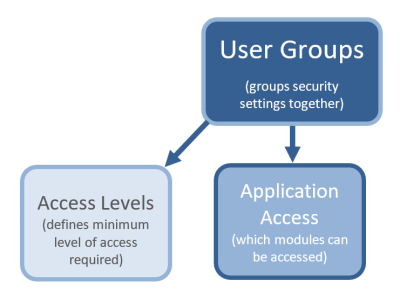
Each user group within the IRIS Financials system can be allocated an access level. The access level determines the minimum level of access required to view and maintain data in the specified module/application.
For example, the Purchasing Control user group has access level 3 access, to Accounting.
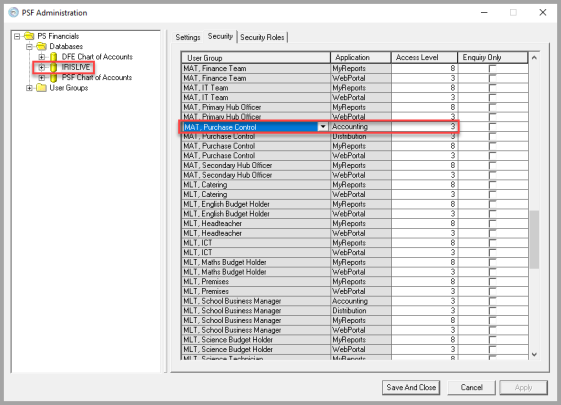
Any users who are members of the Purchase Control user group have level 3 access enabling them to view and maintain IIRIS Financials data.
Access levels range from 0-9 with three levels typically used:
-
Level 3 – for standard users who mainly need to access the data used on a day-to-day basis.
-
Level 8 – for power users who mainly administer and report on financial data.
-
Level 9 – for System Administrators only.
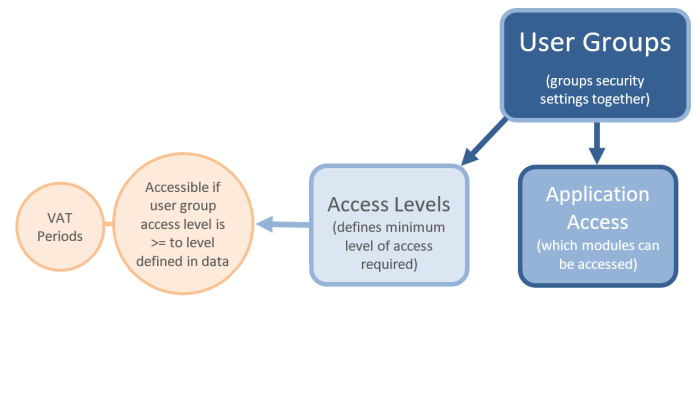
When you have set the access levels for the user group, review the minimum access level that users need to access applicable data, such as nominals and ledgers. By default, the system assigns access level 3 to most data, so you only need to change the access level for data that you want to restrict to a user group with a higher access level.
This example shows that Access Level 3 is required to access the PURCHASE ledger.
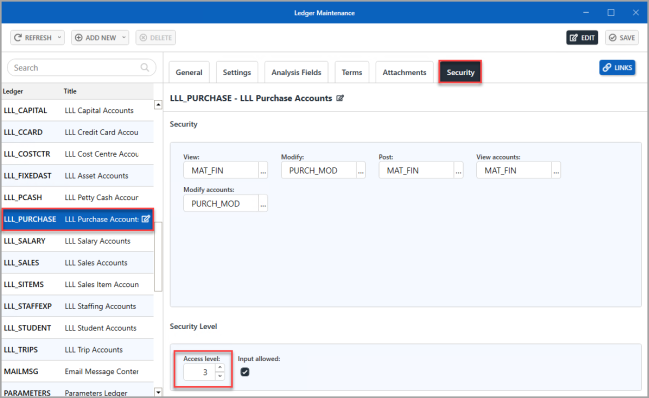
Any user in a user group with an access level of 3 or higher can view, edit, or add data in the PURCHASE ledger.
You may then want to restrict access to certain data functions, such as view, modify, or post. For example, you may want only certain users to modify existing suppliers or create new supplier accounts in the PURCHASE ledger. This is achieved using security roles.
Related Topics
- Apply security to a ledger
- Apply security to a cost centre
- Applying Security to an Account