Move a user from one group to another
This guidance is only for IRIS Financials Version 7.0.2103 or earlier. If using version 7.0.2223 or later, go to Move users to another user group.
CUSTADMIN access only
There may be circumstances where a user changes role within your establishment/organisation and consequently needs different access to the system. This is achieved by changing the user group to which the user belongs.
- Launch the Administrator module by selecting Admin Modules, then selecting Administrator from the menu in IRIS Financials.
- For added security, you are prompted to login again with your System Administrator account details.
- The PSF Administration dialog opens. The left-hand panel shows an explorer view of the system, including the databases and user groups. The right-hand section gives access to the applicable security information, which you can read and edit.
- Expand the user group folder then select the required user name to display the User tab.
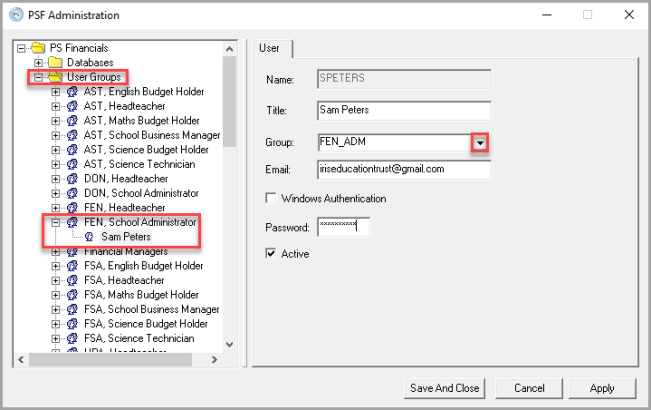
- Select the required user group you want to move them to from the Group list, then select Save And Close.
Changes only take effect once the applicable user has logged out and back in again.