Assign licences to users or remove them
CUSTADMIN access only
When you have loaded licences in IRIS Financials, you must assign them to users so that they can access the software. You can assign licences to a named user or on a concurrent basis.
- Go to Home, then select Licences from the menu.
- Select the licence from the left-hand panel, then select the Users tab.
- To assign a new user to the licence, select ADD NEW. To remove an existing user from the licence, select EDIT.

Add users to a licence
- The Select up to users dialog opens. Select the users that you want to assign the licence to, then select OK.
- The selected users appear in the users list in the centre of the Licence Assignment window.
- When you have completed the licence assignments, select SAVE.
- An update complete message displays. Select OK to close the message and return to the window.
Remove users from a licence
- Select the user that you want to remove from the licence from the centre panel. Their details appear in the right-hand panel. Select the X, as this graphic shows.
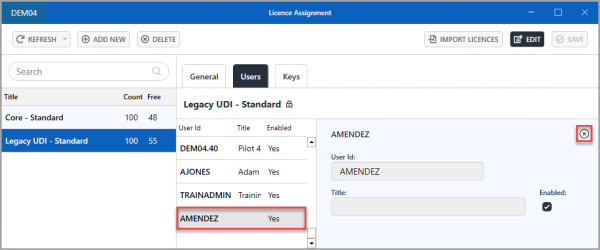
- The user appears with a strike-through. Repeat this process for any other users whose licence you want to remove.
-
When you have completed the licence assignments, select SAVE.
- When you have completed the licence assignments, select SAVE.
- An Update complete message appears. Select OK to close the message and return to the window.