Common errors
When posting and importing information such as budgets, transactions, and catalogues, it is important that the data you enter is consistent with the set up of your system. If you enter any data that is incorrect the import fails.
This following table contains a list of some of the most common errors and a summary of what you need to do to fix them. More details about each error can also be found in this topic.
| Error Code | Description | Summary |
|
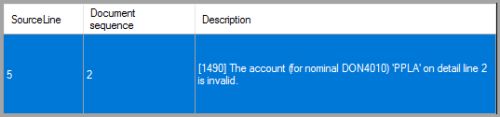
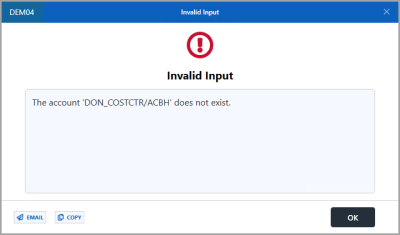
The account for nominal ABCxxxx on detail line x is invalid The account xxxx/xxxx does not exist. |
The account you have entered on this row does not match that of an account on the ledger linked to the nominal. This is usually as a result of a typo, the account not exsisting, or the account is on another ledger. | |
| 1491
10465 |
Input is not allowed for the nominal ABCxxxx on detail line x Not permitted to post to nominal ABCxxxx |
Input allowed box is deselected for the specified nominal. Your CUSTADMIN user needs to turn it on or you need to specify another nominal on the import. |
| 1493 | User does not have appropriate security role for the nominal ABCxxxx on detail line x | The user does not have the applicable security roles to post to the nominal. Your CUSTADMIN user needs to give the user access. This typically occurs when importing. |
| N/A | Input is not allowed for account xxx_xxxx/xxx | Input allowed box is deselected for the specified account. Your CUSTADMIN user needs to turn it on or you need to specify another account on the import. |
| 2401 | The period xxxx/xx.xx is invalid or closed (check access) |
The period that you are posting into is closed or is not in the correct format. Select another period or speak to your CUSTADMIN user to give you access to post into the period. Also check the period is in the correct format. |
Error 1490 - The account for nominal ABCxxxx on detail line x is invalid / the account xxxx/xxxx does not exist
Error 1490 means the account you have entered on this row does not match that of an account on the ledger linked to the nominal. This is usually as a result of a typo, the account does not exist, or the account is on another ledger. There are two variations of this error, but both are caused by the same issue and have the same solution.
To correct this error:
- Select Maintenance, then select Nominals from the IRIS Financials menu.
- Select the applicable nominal mentioned in the error message
- Select Maintenance, then select Ledgers from the IRIS Financials menu.
- Select the ledger that is linked to the nominal
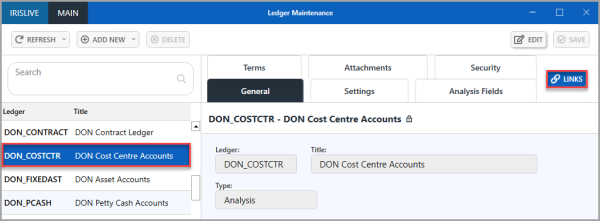
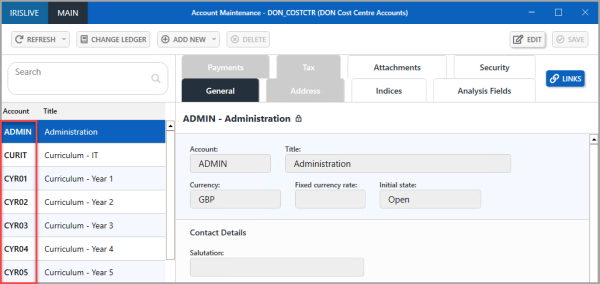
- Select LINKS > Accounts. The applicable Account Maintenance window opens
Error 1491 / 10465 - Input is not allowed for the nominal ABCxxxx on detail line x
Error 1491 / 10465 means Input allowed is deselected for the specified nominal. Your CUSTADMIN user needs to turn it on or you need to specify another nominal on the import.
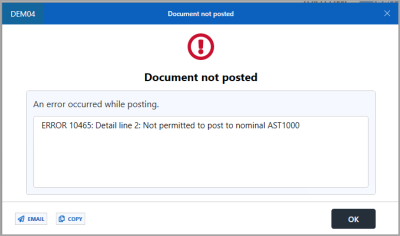
To do this:
- Select Maintenance, then select Nominals from the IRIS Financials menu.
- Select the nominal detailed in the error message.
- Select the Security tab, then select EDIT.
- Select Input allowed, then select SAVE.
Error 1493 - User does not have appropriate security role for the nominal ABCxxxx on detail line x
Error 1493 means the user does not have the applicable security roles to post to the nominal. Your CUSTADMIN user needs to give the user access. This typically occurs when importing.
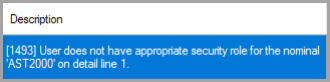
To resolve this issue:
- Select Maintenance, then select Nominals from the IRIS Financials menu.
- Select the nominal detailed in the error message.
- Select the Security tab, then note the security roles in View and Post. For example, PSF1.
- Select Maintenance, then select Nominals from the IRIS Financials menu.
- Select the applicable User Group containing the user who is unable to access the nominal, then select the Users tab to see the users in a group.
- Select the Security Roles tab, then select ADD NEW > SECURITY ROLE.
- The list of security roles appears. Select the applicable security roles, then select OK.
- Select SAVE.
Error - Input is not allowed for account xxx_xxxx/xxx
This means the Input allowed box is not selected for the specified account. Your CUSTADMIN user needs to turn it on or you need to specify another account on the transaction.
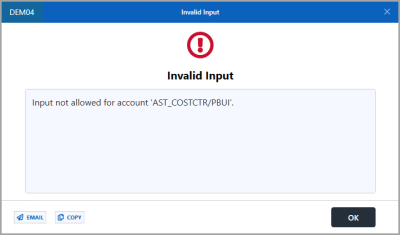
To do this:
- Select Maintenance, then select Ledgers from the IRIS Financials menu.
- Select the ledger detailed in the error message
- Select LINKS > Accounts to open the list of accounts on the ledger.
- Select the applicable account,, then select the Security tab.
- Select EDIT, then select Input allowed.
- Select SAVE.
Error 2401 - The period xxxx/xx.xx is invalid or closed (check access)
Error 2401 means the period that you are posting or importing documents into is closed or is not in the correct format. Select another period or speak to your CUSTADMIN user to give you access to post into the period.

To correct this error:
- Select Maintenance, then select Periods from the IRIS Financials menu.
- Select the period to which you are trying to post, as detailed in the error message description, for example, 2020/21.08, then select the Security tab.
- You may need to change the security role to allow posting to the period. For more information on opening and closing accounting periods, go to Open and close accounting periods.
Alternatively you can give the user the applicable security role to allow them to post into the accounting period. For more information, refer to Assigning Security Roles to User Groups.