Produce a list of ledgers
This topic provides an overview of the default ledgers available in the software, and explains how to select the criteria to run ledger lists for specific information. It assumes you are familiar with producing ledger lists. For more information, refer to Producing a Ledger List.
The list of ledgers includes:
Default ledgers available in IRIS Financials
Default ledgers available in IRIS Financials
These tables list the default ledgers in IRIS Financials.
Your establishment / organisation may have added extra ledgers that do not appear on this list. If you have any queries, speak to your the person within your establishment / organisation who administers your system, that is, has a CUSTADMIN login.
Analysis ledgers that you can link trading nominals to
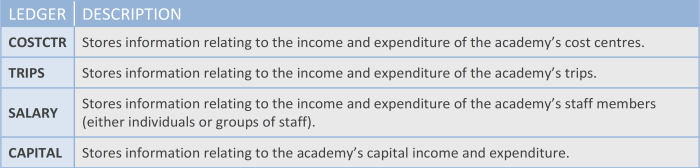
Ledgers that you can link balance sheet nominals to
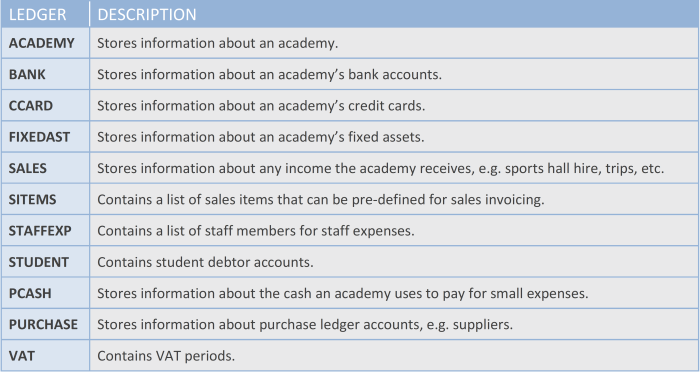
Ledgers for system functions that only your system administrator can amend
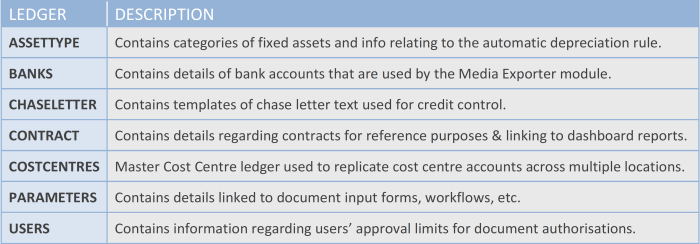
Produce specific ledger lists
This section assumes your are familiar with selecting criteria to produce a ledger list. For more information, refer to Producing a Ledger List.
You can produce ledger lists for information in specific ledgers. These examples are typical ledger lists that you might need to produce, with the selection criteria you need. Select an option for more details:
Account transactions
Produce a summary of all the transactions within particular accounts that are within a particular ledger. For example the spending against budget for departmental spends; supplier spends or net book value of fixed assets. For more information, refer to Producing a Ledger List.
Current fixed assets
It is advisable to regularly check the list of fixed assets to make sure they are still in working order and accounted for. This is achieved by producing a ledger list. You can also use this list to check that the system does not already contain an asset you need to add. For more information, refer to Producing a List of Current Fixed Assets.
Approvers and authorisation limits
You can produce a list of approvers and their authorisation limits whenever you need one. For more information, refer to Produce a list of approvers and their authorisation limits.
Cost centre approvers
You can produce a list of the approvers assigned to each cost centre (or other ledger) whenever you need one. For more information, refer to Produce a list of cost centre approvers.