Add payroll details to the journal upload payroll file
The following details must be entered on the Journal Upload Format Payroll file:
- Document Type — The location's document code for Journal (XXGJ) or Payroll Journal (XXPJ)
- New Doc Flag — Starting at 1, enter the line number to display the transaction on
If adding more than one document, each new document must start at 1.
- Doc Date — Enter in DD/MM/YYYY format
- Year — Enter in the Code format for the Years key list
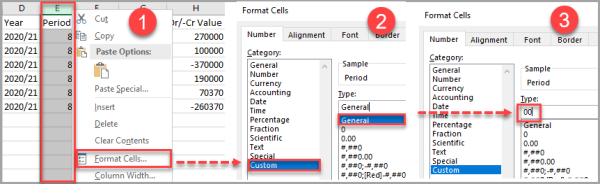
- Period — Must be in the same format as period numbers, such as 01
To make sure the system keeps the leading zeros when you save the file, format the cells as Custom, and enter 00 in Type.
- Nominal — Enter the code to post the document to
- Account — Enter the Ledger code to post the document to
- Amount — Enter the amount as a debit or credit
- Description — Enter a meaningful description to identify what is recorded in the document if enquired
- Currency — This is typically GBP, but if the payments are in another currency, enter the applicable currency code