Open or save attachments
There may be many occasions when you want to attach files to a particular purchasing document. This provides the facility to keep all related paperwork together and also lets other users open the related files.
You can add attachments to requisitions, purchase orders, goods received notes (GRNs), and invoices. The type of attachment added may vary based on the document, but typical examples include quotes, photos, diagrams, catalogues, GRNs, and invoices. You can add any file type as an attachment.
You can open or save all attachments for future reference. You need to save an attachment only if you need a copy stored locally rather than on the server.
Open the document containing the attachment, such as the requisition.
- Point to the Attachment icon until any attachment names appear.
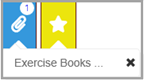
- Select the required attachment name then either open or save, as this graphic shows.
