Handle missing or damaged items
There may be occasions when ordered items are either missing or damaged. Record this accurately in IRIS Financials Purchasing so that you can identify any outstanding items and invoice goods correctly.
It is essential that GRNs correctly reflect what goods have been received. We recommend that you put vigilant internal procedures in place so that goods received are accurately checked before the physical goods received note is passed on to the Finance Team.
When items are missing or damaged, create a GRN and amend the applicable quantities before you post the GRN. It is advisable to add a suitable comment to the GRN. You can also attach photos of the damaged items, or copies from the physical delivery note by adding them as an attachment.
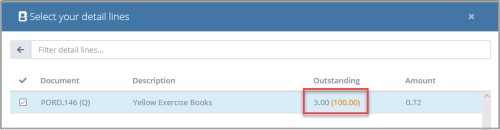
Reducing the quantity automatically makes sure that the number of missing or damage items is left outstanding. When the extra or replacement items are received, you can create another GRN for the applicable purchase order, which correctly shows the number of outstanding items. The original quantity ordered appears in brackets.
If for any reason some items do not arrive (for example, a supplier decides to refund for damaged goods rather than resend them) or items are not able to be found, you either need to write off or cancel the items on the original order. For more information, refer to Write off or cancel documents.