Log out of PS Cloud
Instead of correctly logging out of PS Cloud, some users select the X on the PS Cloud toolbar for quickness (or because they have not been shown the correct method).

Using this method closes the Remote Desktop Connection (RDP) window, but does not disconnect the session. The user remains logged in to all IRIS Financials applications and their session continues running in the background, using up valuable system resource on the server.
If several users log out of PS Cloud using this incorrect method, they use significant system resource and slow performance for other users. It also prevents the System Administrator from successfully running a system audit.
Make sure you use the method described in this section to correctly log out of PS Cloud.
- Make sure you have completed any work and that all IRIS Financials applications are closed down.
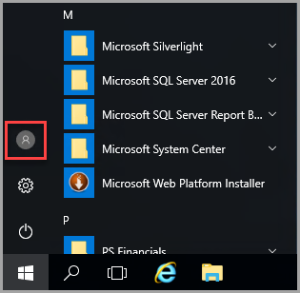
- On your PS Cloud desktop select the Windows button.
- Select the User icon.
- Select Sign out from the pop-up menu.
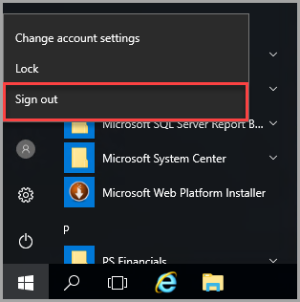
- This correctly logs you out of the PS Cloud environment.