Enable access to the Cloud Self Service
To access the PS Cloud Self Service, contact the IRIS Financials Support Team. Include a list of the users who need access and the level of access that each user needs, as this table shows. This email request must come from a Finance Director or Business Manager within your establishment / organisation.
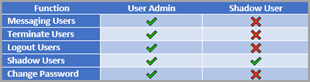
User Admin - has full access to the PS Cloud Self Service application.
Shadow User - can take control of, and monitor, another PS Cloud user's session (within your establishment / organisation only).
We recommend having two user admins to make sure absence cover, and also assigning Shadow User access to all experienced users to enable them to help other colleagues who may require training or guidance.