Troubleshoot direct debits
The following issues may arise about direct debit payments. Follow the instructions for the applicable issue:
Document not posted error messages when you edit the posted direct debit document
The following error messages may appear when editing a journal document for a posted direct debit payment:
The Tax Account in the VAT Ledger is Closed
The Accounting Period is Closed
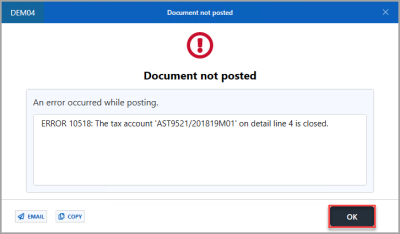
The tax account in the VAT ledger is closed
If the tax period to which you are posting the edited direct debit payment document is closed, you cannot post the document until you set the tax period to the next available open period.
-
On the Document not posted dialog, select OK to return to the PSFJournal document input form.
-
On the PSFJournal document input form, double-select in the Account field on the closed VAT period, double-select to select the next available open VAT period from the Select VAT account dialog, then select OK.
If the VAT line is allocated, then speak to the person in your establishment/organisation who completes the VAT return as the period should not be re-opened after it has been closed down. You can edit or reverse (cancel) documents that include an allocated VAT line. -
When you have updated the VAT Period, press F5 or select POST to confirm and save the changes.
The accounting period is closed
If the accounting period to which you are posting the edited direct debit payment document is closed, you cannot post the document until you set the accounting period to the next available open period. For more information, see, Open and close accounting periods.
-
On the Document not posted dialog, select OK to return to the PSFJournal document input form.
-
On the PSFJournal document input form, select in Period, then enter the details of the next available accounting period. In this example, 2020/21 05, has been entered.
-
When you have updated the accounting period, press F5 or select POST.