Post intracompany documents (v2 and v4 only)
When posting any transaction across multiple locations, i.e. debiting one location's nominals and crediting another, this will create a difference on the trial balance for each of the locations (although the consolidated TB will still balance).
The system allows you to post the balancing entries using the 9515 nominal code for each location using the INTR document type.
In the example below a Non-Order Purchase Invoice has been posted between 2 locations; STO and ASJ.
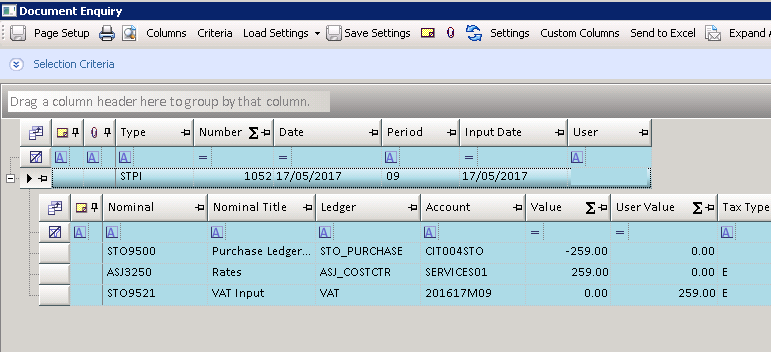
Because the control line of the document is crediting STO, and the expense line is debiting ASJ, both trial balances will show a difference of £259.
To balance this transaction, the intra-company posting will be as follows:
Dr STO9515 / Cr ASJ9515
To create the intra-company document, go to Options >Document Input and select the INTR document type.
Enter the location to be debited in the first column, and the location to be credited in the second. Add the value and a suitable description, you may want to refer back to the original source document to provide an audit trail.
The document will post cross-referencing the locations in the Account column.