Maintaining Depreciation Periods
For fixed assets you need to ensure that the required depreciation periods are available. When the software is installed, a range of depreciation periods are automatically populated and available to your establishment/organisation however, there may be occasions where additional depreciation periods are required.
This topic explains how to create and maintain depreciation periods stored within a keylist in IRIS Financials.
-
Click Masters, then select Keylists from the menu.
-
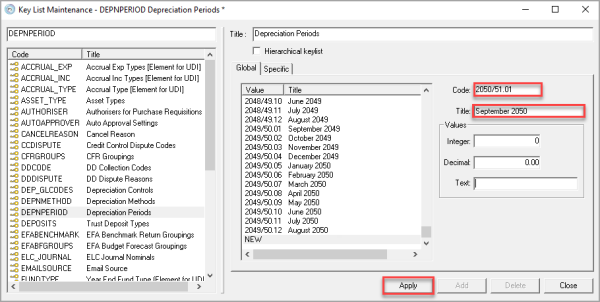
The Keylist Maintenance window is displayed. Select DEPNPERIOD - Depreciation Periods then right-click in the right-hand panel and select Insert.
-
Enter a code for the period in Key, typically the years and month number of the depreciation period e.g. 2050/51.01. Then enter a title for the period in Title, e.g. September 2050, then click SAVE.
-
Repeat to add any additional periods.
To make any changes to existing depreciation periods, simply over type the applicable field(s) and click Apply. Any greyed-out fields cannot be changed.