Set an approver as on holiday
When an approver is on holiday, it is often necessary to set another user as the holiday approver to ensure that orders are not held up in the system.
If an approver is marked as on holiday, all orders are re-routed to the holiday approver within 72 hours.
If the approver is not on holiday and the authorisation is still outstanding after 72 hours, a chase email will be sent to the original approver.
Important: Holiday approvers can authorise requisitions or orders up to the authorisation limit of the approver who is absent, irrespective of the holiday approver’s limits.
Users of PS Purchasing can force orders to be rerouted by repolling the documents if the 72 hour period is too long. See Repolling Documents in IRIS Purchasing.
This section assumes that the new approver has already been created in Financials Administrator.
- Select Masters > Accounts from the top menu.
-
The List of Ledgers dialog is displayed. Double-click the USERS ledger to select it.
-
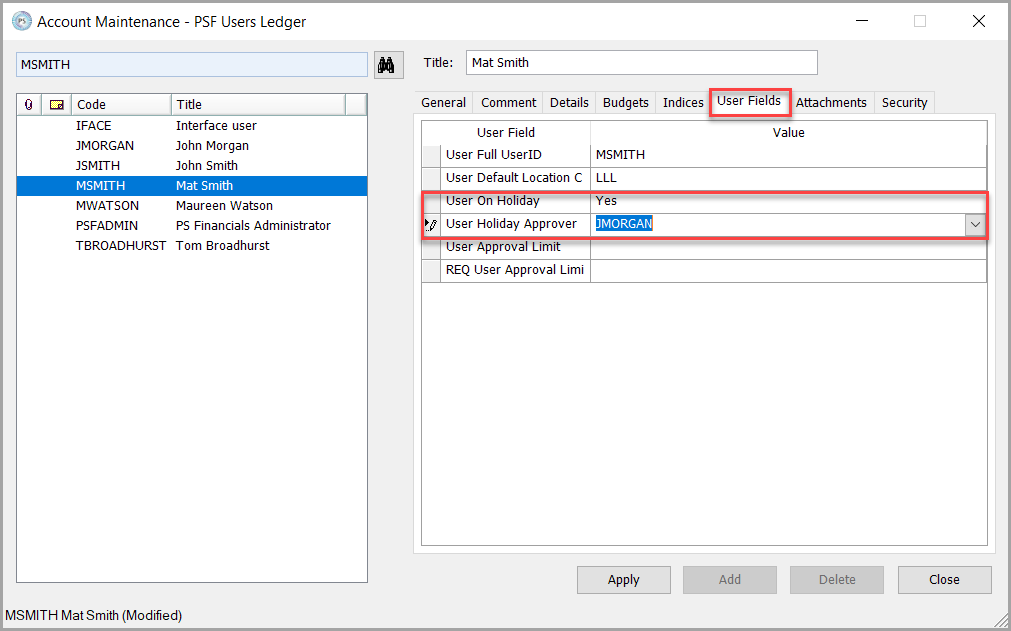
Select the current authoriser of the document(s) e.g.
MSMITH(Mat Smith), then select the User Fields tab.
-
If this approver is on holiday, on long-term sick or has left your establishment/organisation select Yes from the User on Holiday field drop-down list.
-
Select the new approver from the User Holiday Approver User drop-down list, e.g,
JMORGAN - John Morganthen click the Apply button. This will ensure that any documents already awaiting approval from the old approver, will transfer to the new approver within 72 hours. You can manually force these through to the new approver immediately if you do not want to wait. See Repolling Documents in IRIS Purchasing.