Entering Manual VAT Adjustments on the VAT Transfer Document
You may need to enter an adjustment on your VAT transfer document for things like partial exemption. Please note that any manual adjustments need to be calculated prior to entering the information on the VAT Transfer document.
For information about calculating a partial exemption adjustment, refer to Calculating Partial Exemption VAT.
A VAT adjustment transfers the adjustment amount from the VAT
Organisations using Making Tax Digital (MTD), any partial exemptions must be posted before creating the VAT Transfer document and making the submission.
For Claims being submitted through MTD, the system uses the values posted to the VAT Input nominal and the VAT Output nominal . The VAT Adjustment nominal is not included.
To reduce the value of the VAT Input to be included in the VAT claim to account for the partial exemption, before submitting the claim, to reduce the value on the VAT Input nominal, post a General Journal (**GJ) as:
Credit — VAT Input Nominal with the value of the VAT that cannot be claimed.
Debit — VAT Adjustment Nominal and the relevant cost centre account with the same value.
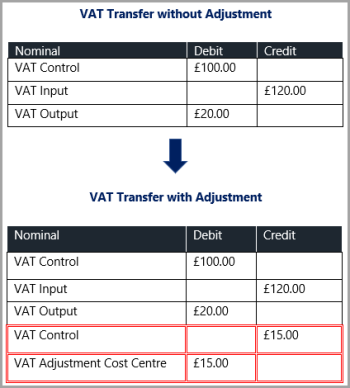
Before posting a VAT adjustment, you must ensure that a suitable cost centre to post the adjustment to exists within the system. If you need to create a new one (refer to Creating Cost Centre Accounts).
-
On the VAT Transfer document input form,
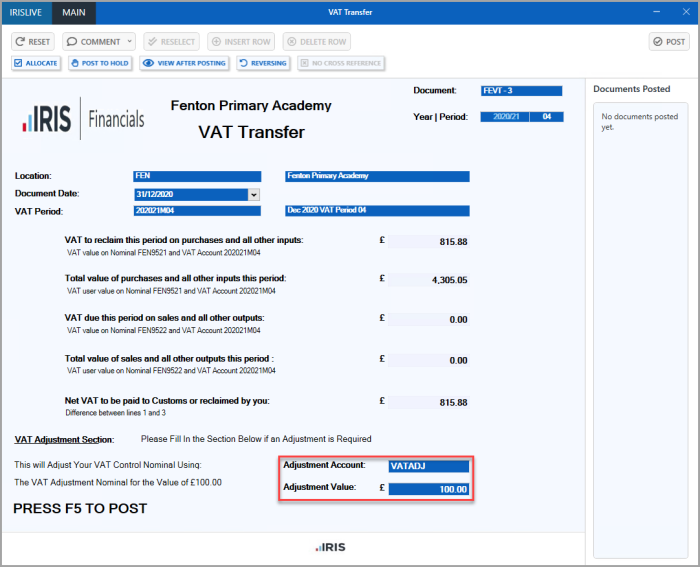
- The Select Account dialog is displayed. Double-select to select the applicable cost centre to post the adjustment to.
- Select Adjustment Value and enter the adjustment value (do not enter any currency symbols i.e. £, $, etc.) Press F5 to post the document. The VAT Transfer document is posted and the adjustment value is posted against the applicable cost centre account.