Manage VAT for documents in the register period
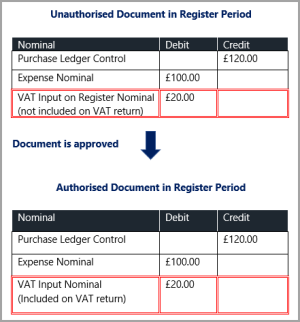
The Register period contains documents that have not yet been approved. Any VAT transactions that are associated with documents in the Register period are posted to the VAT Input on Register Transactions nominal. This means they are not included on a VAT return until they have been approved.
The following graphic shows the accounting entries before and after a document in the register is approved.
Before completing a VAT return, it is recommended you check any documents in the VAT Input on Register Transactions nominal so they can be approved and included on the applicable VAT return.
- Go to Enquiries, then select Detail Enquiry from the menu.
-
The Detail Enquiry Criteria dialog displays. Select Like from the Nominal drop-down list, then enter % followed by your VAT Input on Register Transactions nominal in Value 1.
This searches on all VAT Input on Register Transactions nominals. - Select OK to display the results. Any documents listed are in the Register period and therefore not be included on a VAT return. Right-select on a document, then select Document Enquiry from the pop-up menu.
-
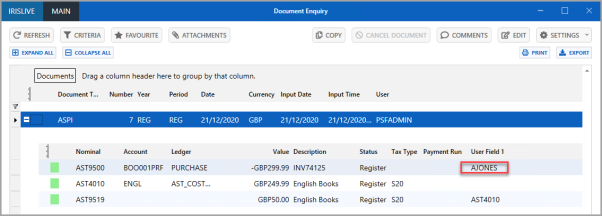
The Document Enquiry window is displayed. The approver for the document is displayed in User Field 1 on the top detail line
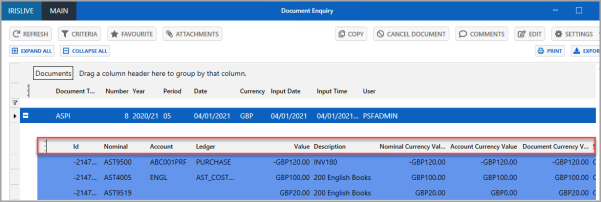
If User Field 1 is not displayed, right-select on the detail header row and select it from the pop-up menu.
-
Once approved, the document automatically moves into the first available VAT period.
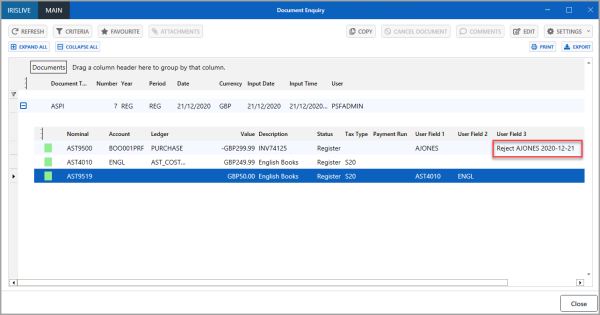
- If the document is rejected, this is displayed in User Field 3. Rejected documents need to be moved out of the register period and then cancelled.