After the VAT Return has been Produced
Ensure that VAT periods for the current financial year are at zero. Sometimes, VAT periods can be inadvertently open and/or document changed or moved. As a consequence, the amount of VAT can change, or move from one period to another. In some instances, this can lead to VAT being claimed multiple times. Ensuring that VAT periods are properly maintained is essential. For more information, please see Maintaining VAT Periods.
Checking VAT periods is achieved by producing a ledger list for all VAT accounts.
- Select Enquries, then select Ledger List from the menu.
- The Ledger List Criteria dialog is displayed. Select Equals from Ledger panel drop-down list, enter VAT in Value 1, then select OK to generate the ledger list.
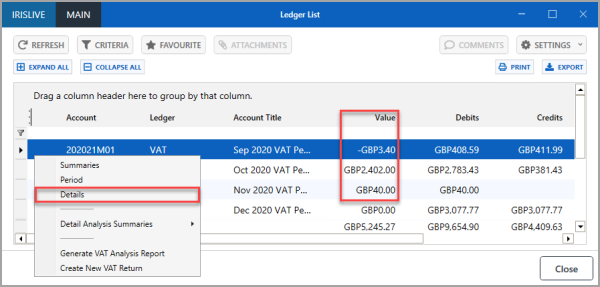
- The Ledger List window is displayed. The Value column should display zeros for every period. In the following graphic, you can see periods 01, 02, and 03 need to be investigated to identify why a value remains in the VAT Period.
- To investigate the difference, right-select on period line, then select Details from the pop-up menu to display the documents in a Detail Enquiry window. For more information, please see Cancelling or Editing a Document in a Closed VAT Period.