 |
 |
|
|
The G & L Dashboard or Gains and Losses Dashboard shows the perceived client gains or losses for the year selected.
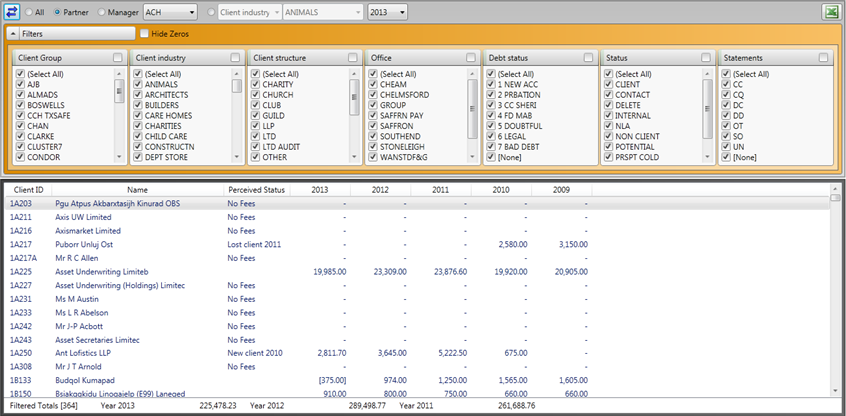
The partner, manager, user selected category and the filters are all taken direct from your IRIS database setup as explained in Figure 9 and Figure 14 and all the available features are discussed in more detail in the Portfolio Dashboard as these Dashboards all work in the same way.
All the information displayed in the G & L Dashboard is automatically populated from IRIS, there is no setup required in the IRIS Practice Dashboards itself, this Dashboard relies totally on your IRIS database setup.
The perceived status is based on your billing history available from the IRIS Fees Ledger. The Dashboard looks at the yearly historical billing pattern to determine the status. This works best if you look at the last complete year of billing, if you look at the current year in progress all your clients will be shown as lost until they have been billed at least once. There are four different types of perceived status, these are :
No Fees the client has never been billed in the past 5 years
New client [&Year] the client has been billed from &Year onwards
Lost client [&Year] the client has not been billed in &Year but has in at least one older year
Empty field the client has been billed in the current year and at least one older year